Neovim

2683 readers
1 users here now

founded 2 years ago
MODERATORS
126


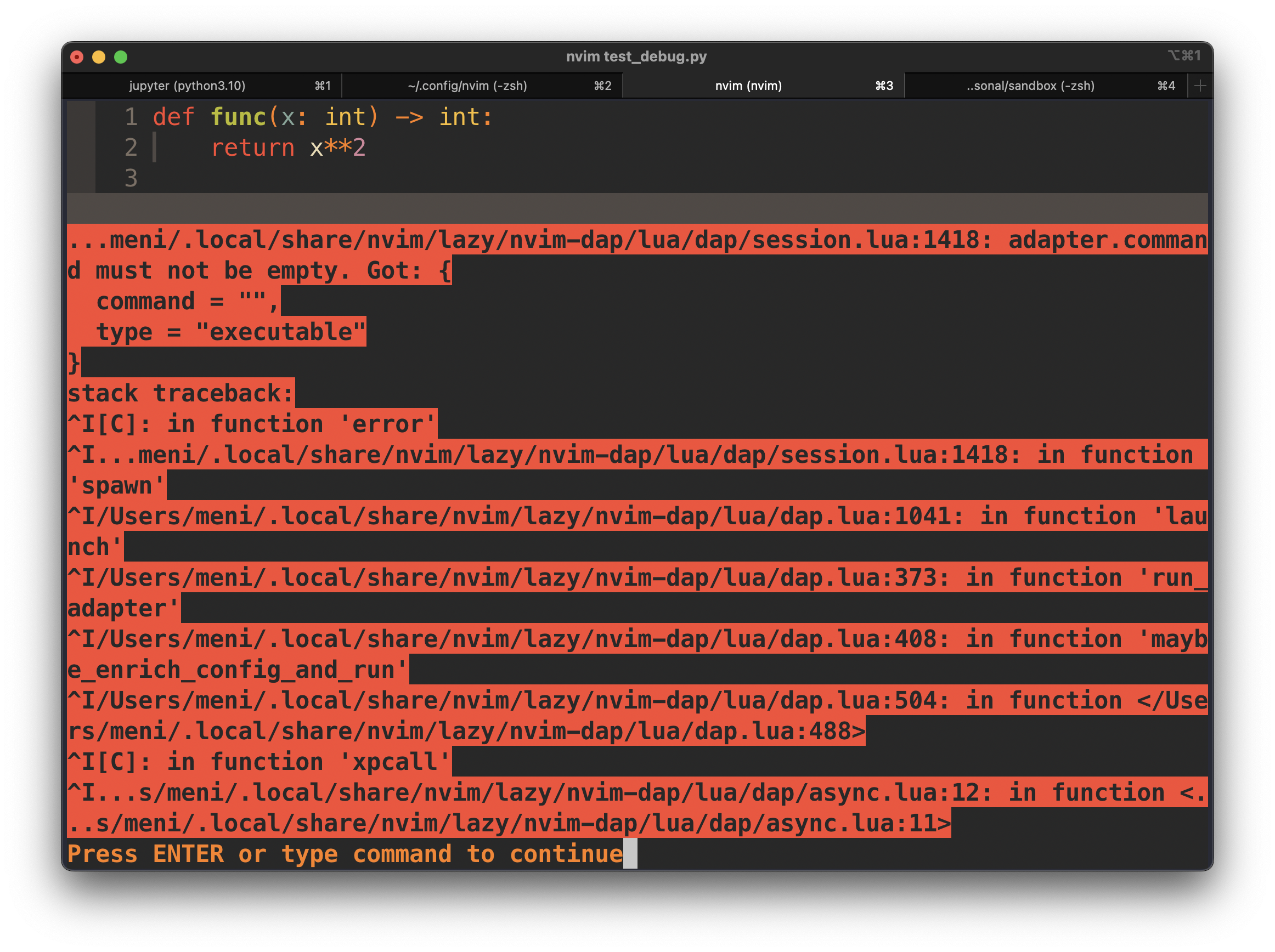
I just installed LSP stuff using Mason (debugpy, pyright, black and flake8) and made sure that they are also installed on my python environment.

This pops-up when I try to start DAP (by either F5 or by :DapContinue).

I'm quite new to neovim so I might be missing somthing basic,

127


cross-posted from: https://lemmy.ml/post/9648279

I would like to premise this with the following:

  • The best approach is probably just testing out each and every editor that interests me until I've found what works best for me.
    • However, I wonder to what degree a test as such would be representative when the likes of Emacs and (Neo)Vim are considered; both of which are known for being a life time learning process.
  • I don't literally expect Emacs or (Neo)Vim to be drop-in replacements for any IDE. Some of the most basic IDE-functions are absent by default and some (perhaps more advanced) functionality might simply not be attainable at all.
  • I am not interested in anything that remotely resembles a flame war. The community at Lemmy has so far been very kind to me; let's keep it that way ๐Ÿ˜œ.

Motivation

I've had experiences with Atom, VS Code and some of Jetbrains' IDEs like Pycharm and Rider. While I've been generally content with all of them, it leaves a bad taste in my mouth whenever I'm forced to switch IDEs because their lifetimes and/or lack of extensibility doesn't allow me to responsibly continue using them. As such, I'm interested in a long time investment that will grow as I will. Both Emacs and (Neo)Vim have passed the test of time and I honestly don't think they'll cease to exist in the upcoming decades, that's why I would love to start using either one of them.

Furthermore, Vi(m) keybindings seem to be somewhat ubiquitous and almost any IDE offers some support. As such, improving my Vi(m)-game should only net-positive my productivity (at least eventually). Also, fluency will benefit me whenever I'm remote accessing any random server as they will always have Vi(m) installed. Thankfully, this doesn't force me to use Vi(m) (or Neovim) just yet, because Emacs offers with Evil perhaps the single best Vi(m) implementation; outside of native Vi(m)*.

My setup:

  • I'm on a custom image of uBlue using their startingpoint as template. For those unaware; an oversimplification would be that it is Fedora Silverblue with some extras.
  • As such, I would like to have my developer environments local and have used Distrobox to that extent using steps similar to the ones outlined over here. But I'm not married to that specific way of utilizing local containers. So please feel free to recommend me something that's at least as good.
  • If I go for Emacs, then I will definitely rely on Evil.
  • If possible, I would like to use it for C#, Python and Rust. Furthermore, I engage in editing Bash scripts, Dockerfiles, Linux config files, texts written in Latex and/or Markdown and other files written in Nix or JSON. As both are very extensible, I don't expect any issues, but I might be wrong.

Questions:

  • First of all, does it make sense for me to only consider these two?
  • Can the split between Vim and Neovim be interpreted as the first schism and as such be a forebode for what's yet to come?
  • Google Trends suggests that Neo(Vim) is ever-popular. On the other hand; not only is Emacs relatively less popular, but its popularity seems to be slightly declining. Should this worry me regarding their long-time future? Especially considering that a thriving community is literally the lifeline for both of them.
  • For those that have used both extensively, which one do you prefer (if any) and why?
  • While I understand that the power of both of them lies primarily in how one can literally make them behave however suits their workflow best. Therefore, the use of premade configs and/or starter kits/distributions should (ideally) only be used either temporary or as a starting point. However, at this point, they provide a decent showcase of what each 'platform' has to offer. So:
128


I'm new to vim and getting the hang of the configuration. I've gone through a couple of youtube videos giving a tutorial of setting it up with lazy.nvim. Now I am following ThePrimeagen's config, and UndoTree doesn't work.

The plugin is loaded and my config is properly sourced, but when I run run :UndoTreeToggle, I get this lovely error:

(E5108: Error executing lua: function undotree#UndotreeToggle[11]..<SNR>37_new[2]..41, line 6: Vim(echoerr):"diff" is not executable. stack traceback: [C]: at 0x7ff77ae89570)

I am running windows (currenty in the process of backing up my personal data so I can try out Linux without feeling too disconnected from my daily computer user). I did a little bit of google searching and checked the issues on github, unfortunately I couldn't find anything related to my problem. Any help would be much appreciated.

129


Just thought I'd share here in the hopes of getting some feedback, and maybe it's useful for someone.

I created my first Neovim plugin, inspired by ranger.nvim (this is a fork of that) and other similar plugins. The main difference is allowing the user to choose between different popular terminal file managers so that they can try them out and see how they fit into their Neovim workflow. I also added some niceties like buffers are closed when deleting a file in the file manager and also allowing for completely replacing netrw.

Let me know what you think! I won't lie it took a lot more hours than I'd be willing to admit for something so simple. May also post to R***it since unfortunately that's still the bigger Neovim community.

130
10
submitted 2 years ago* (last edited 2 years ago) by lautan@lemmy.ca to c/neovim@programming.dev


I made a quick plugin to open files found on Telescope inside Neotree:

local open_in_neo_tree = function(prompt_bufnr)
    local action_state = require "telescope.actions.state"
    local Path = require "plenary.path"
    local actions = require "telescope.actions"

    local entry = action_state.get_selected_entry()[1]
    local entry_path = Path:new(entry):parent():absolute()
    actions._close(prompt_bufnr, true)
    entry_path = Path:new(entry):parent():absolute() 
    entry_path = entry_path:gsub("\\", "\\\\")

    vim.cmd("Neotree close")

    file_name = nil
    for s in string.gmatch(entry, "[^/]+") do
        file_name = s
    end

    vim.cmd("Neotree filesystem reveal reveal_file=" .. entry_path .. "/" .. file_name)
end

require("telescope").setup {
  defaults = {
    layout_strategy = "vertical",
    mappings = {
      i = {
        [""] = open_in_neo_tree,
      },
....
131
16
submitted 2 years ago* (last edited 2 years ago) by ericjmorey@programming.dev to c/neovim@programming.dev
132


I have Ctrl-h mapped to move to the pane left of current in Normal Mode. If I forget that I'm in insert mode and do this, it just locked up Neovim and starts consuming processor until I force quit. I can't find what this mapping is trying to do and how to undo it. It occasionally causes me to lose work. Please help. :-)

EDIT: I just looked in my config to try to just add this binding to do the same thing in Insert Mode and discovered that that's what it's already supposed to do. I have CTRL-H mapped to , but all it does is lockup Neovim.

133


Im using neovim with nvchad, and i discovered accidentally that when im in edit mode and i type j more than 3 times in insert mode, it kicks me out of it, why does it happen?

134


An online conference about NeoVim is happening this Friday from 10:30 am EST to 5:30 pm EST

Seems like this year is split between (6) live and (11) pre-recorded presentations.

Their YouTube channel has playlists of prior years presentations

It's free to sign up and "attend".

It will be streamed on https://www.twitch.tv/theprimeagen

135


I've been coding exclusively in Neovim for about 4 years now.

While it's been awesome, one of the minor pain points is it's inability to render some complex scripts properly. I'm from Burma and Burmese script is part of Indic script family, which also includes Indian language scripts like, Tamil and Devanagari. Now, rendering of these scripts seem to be quite complicated compared to roman scripts or even to CJK scripts.

Searching around the web with my limited knowledge shows there's this term "complex text layout" (CTL) for these kind of scripts. Full GUI editors like emacs seem to have no problem with this since most of them just use this library called harfbuzz that implements CTL.

Now, I've tried a lot of Neovim GUI front-ends to see if they support CTL. Most of them doesn't work. The exceptions are the VSCode plugin (fully works) and Onivim2 (works but have some spacing issue). I'd rather avoid VSCode and Onivim2 seems to be moving toward some kind of freemium/paid model.

There are a few github issues like this that kind of explain the problem with Neovim and complex scripts. It seems mono-spaced sizing is ingrained into the vim protocol itself. May be it works on VSCode and Onivim2 because they're ignoring Neovim's UI protocol and somehow hooking up text rendering to their own existing UI?

Did anyone ever manage to get complex scripts working in Neovim?
136


What is kitty-scrollback.nvim?

A Neovim plugin (and Kitty Kitten) that allows you to navigate your Kitty scrollback buffer to quickly search, copy, and execute commands in Neovim.

kitty-scrollback.nvim demo

v2.2.0 adds support for Neovim v0.9

kitty-scrollback.nvim was originally written only supporting Neovm v0.10 (nightly). Thanks to community interest, I have added support for Neovim v0.9 for those that prefer using a stable version of Neovim. If you have any problems or questions feel free to open an issue or discussion here https://github.com/mikesmithgh/kitty-scrollback.nvim

Neovim Conf 2023: Developing kitty-scrollback.nvim

kitty-scrollback.nvim neovimconf

I am doing a lightning talk at Neovim Conf this year about developing kitty-scrollback.nvim. https://neovimconf.live/speakers/mikesmith/

If you are interested in Neovim, block off your day on Dec 8th ๐Ÿ™‚ and register here https://neovimconf.live/

137


As title, I'v installed mini.comment plugin, but when I type gc for commenting a line nothing happen. How can I know what's wrong without disable every other extension or proceding incrementaly from scratch? (don't want to intterrupt my workflow) Thanks

138


Hello, I was trying to configure i3 to match the functionality of vim (i3 uses jkl; because h is mapped to horizontal split), but when I was doing it I was wondering what the reason is behind every vim or vim-like editor using hjkl. It's rather inefficient to have to move your index finger to the h key every time you want to move left. I know that the creator of vi had his hjkl keys mapped to arrow keys, but why hasn't this changed. Is it a historical thing, or is there an actual logical reason.

139


Released nvim-dap 0.7.0

See https://github.com/mfussenegger/nvim-dap/releases/tag/0.7.0 for the full release notes

There's still lots of stuff to do before it will hit a 1.0.0, but getting closer.

@neovim #neovim

140


Hi, how can I associate to a var a path with both env variable and text? something like this for example: let trial=$HOME/dir1/dir2/$env1/dir3 I saw that let trial=$HOME works when I echo it, but if I add $HOME/dir1 it doesn't anymore....any help? Thanks

141
142
143


nlua - neovim as lua interpreter

https://github.com/mfussenegger/nlua

I had previously written about how to create a script that uses neovim and emulates the lua interpreter cli - now I finally got around to extract it into a dedicated project, with some instructions on how to use it with luarocks.

#neovim @neovim

144


kitty-scrollback.nvim has officially released v2.0.0!

What is kitty-scrollback.nvim?

kitty-scrollback.nvim

A Neovim plugin (and Kitty Kitten) that allows you to navigate your Kitty scrollback buffer to quickly search, copy, and execute commands in Neovim.

Migrating to v2.0.0

See Migrating to v2.0.0 for the detailed migration guide.

What changed?

  • The --config-file option has been removed. Custom configurations are now supplied in the setup() function instead of separate config file. The config name corresponds to the key of the table provided to setup().
  • The default mapping keys changed from ctrl+shift to kitty_mod
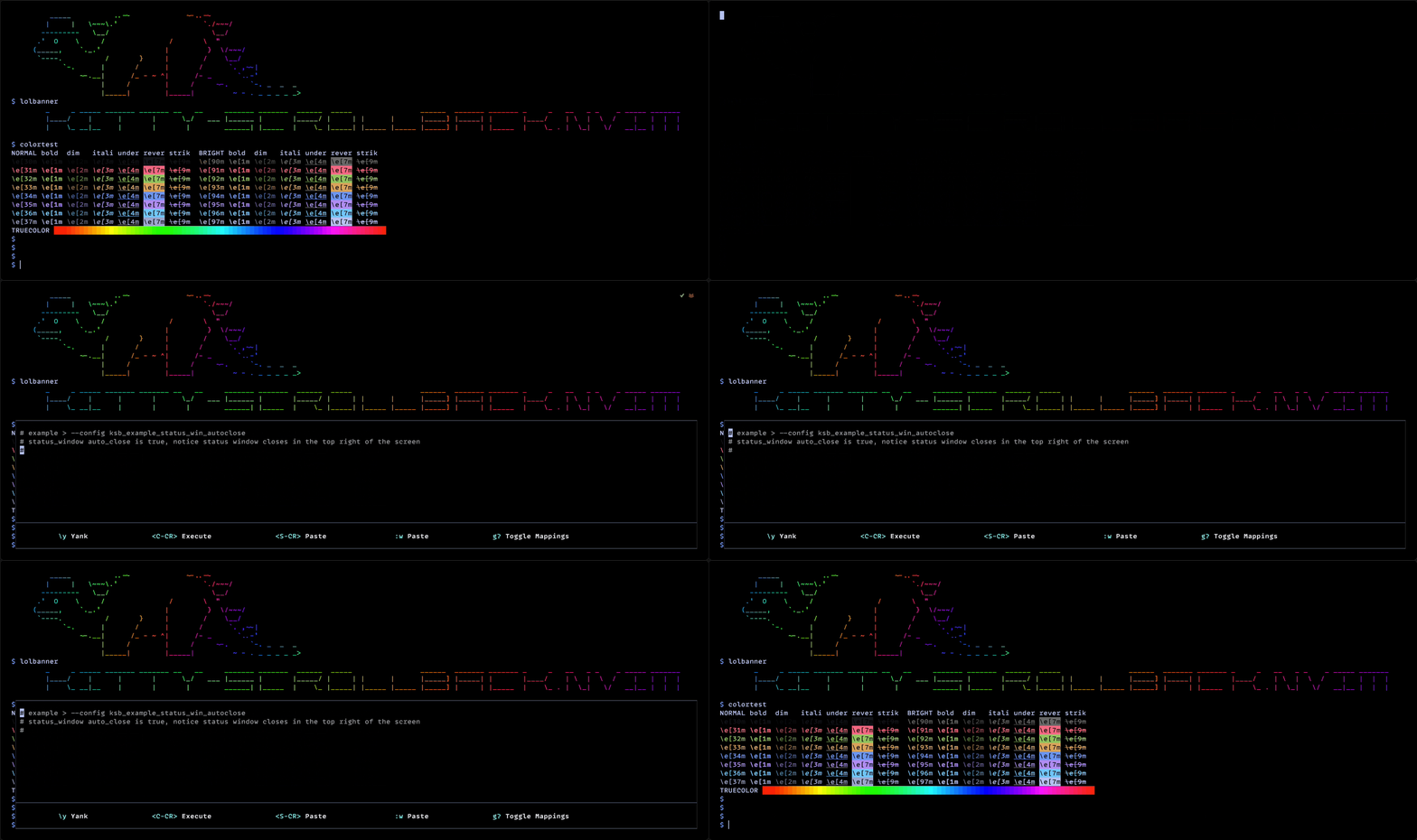
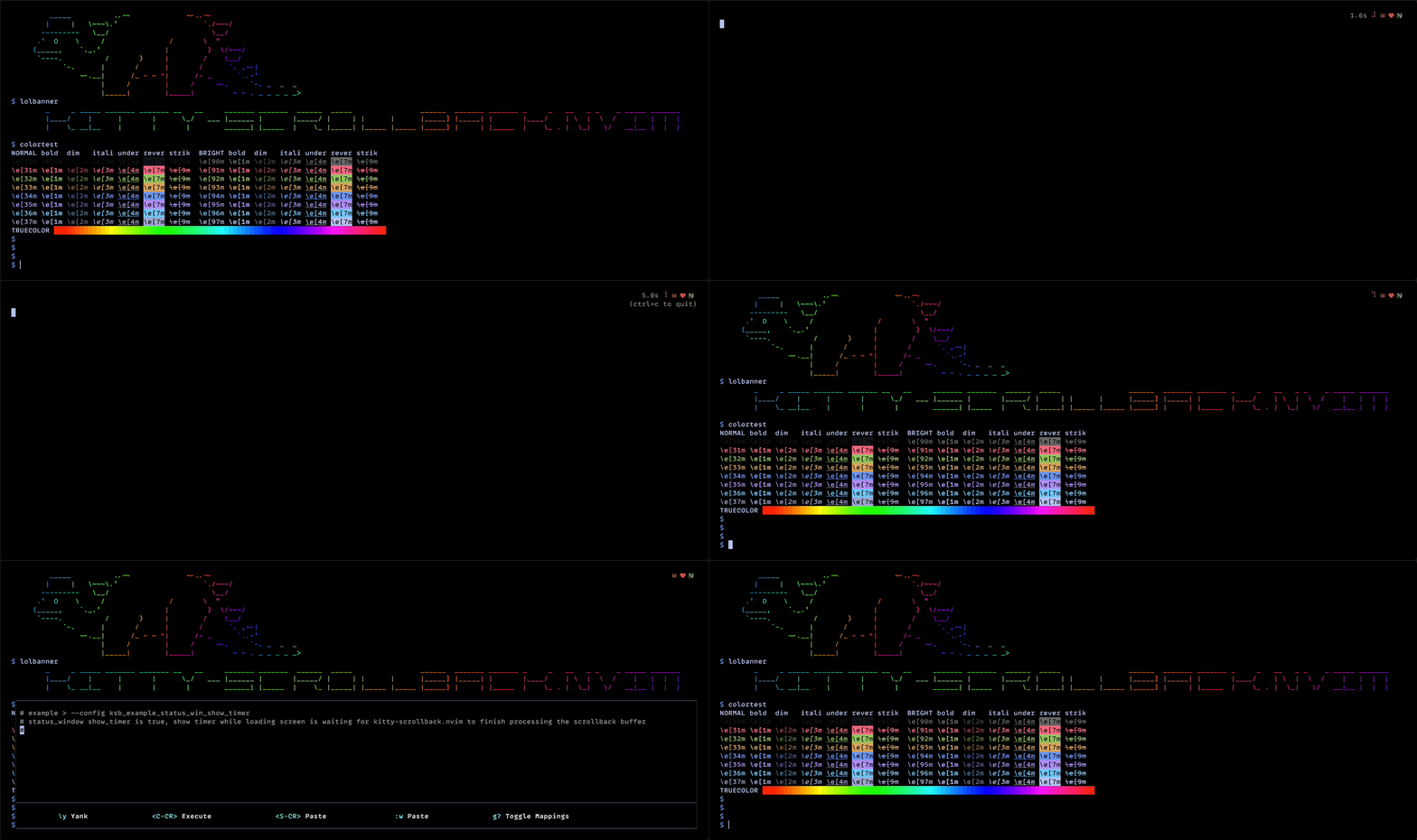
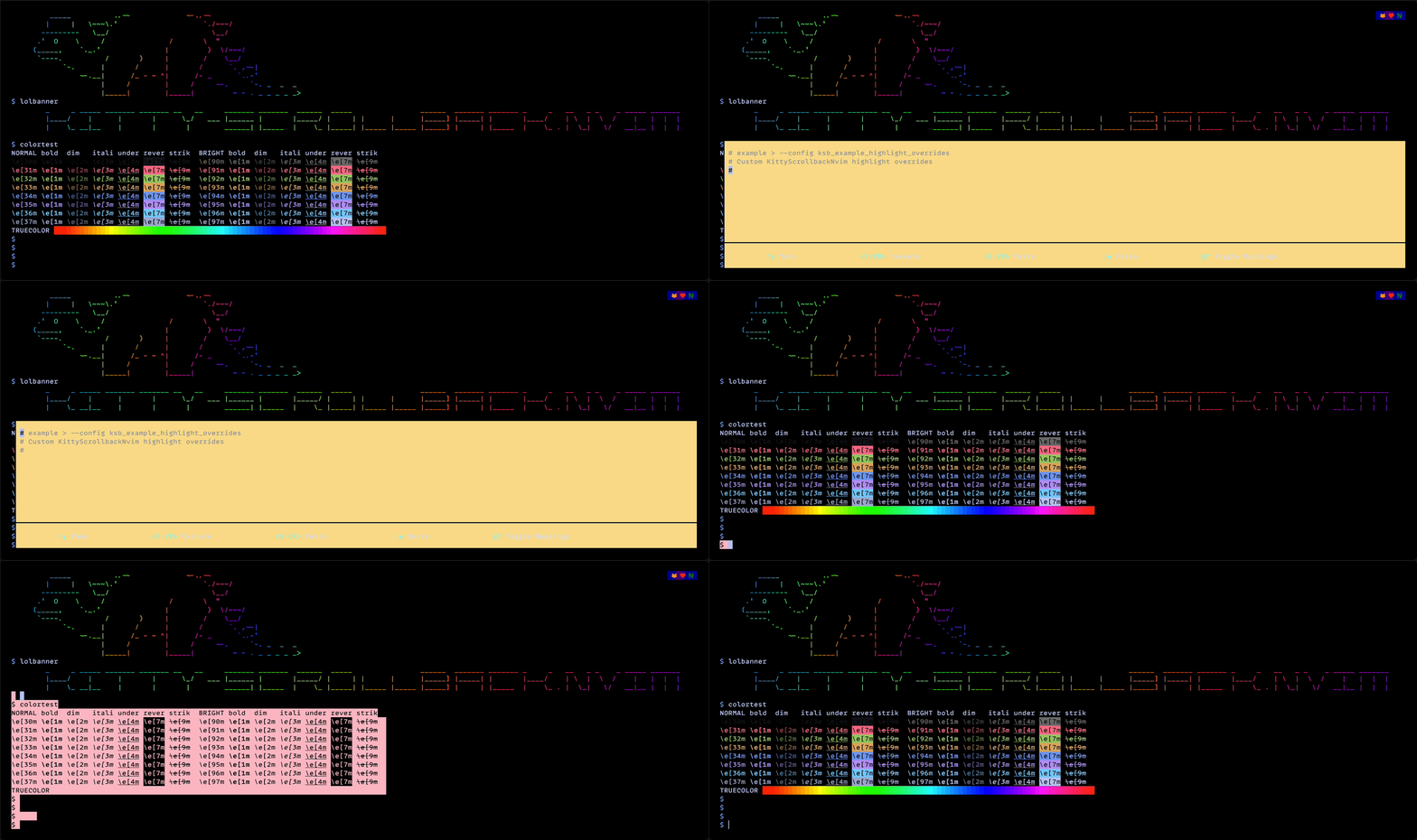
  • 36 demos added to the Wiki Advanced-Configuration to exercise the different configuration options of kitty-scrollback.nvim. Here are a few.

ksb_example_status_win_autoclose ksb_example_status_win_autoclose

ksb_example_status_win_show_timer ksb_example_status_win_show_timer

ksb_example_highlight_overrides ksb_example_highlight_overrides

ksb_example_paste_win_winopts ksb_example_paste_win_winopts

ksb_example_nvim_args_tokyonight ksb_example_nvim_args_tokyonight

ksb_example_nvim_args_cellular_automation ksb_example_nvim_args_cellular_automation

If you have any questions, comments, or feedback feel free to let me know here or create an issue.

Breaking Changes ๐Ÿ˜ฟ Sorry breaking-changes-cat

145


I recently started a fresh configuration using kickstart.nvim.

I noticed that sometimes when I writing python files when I press space (which is my key) followed by : the line indentation increase. It doesn't seem to happen on text files. I didn't find any configuration which maps this behavior

Any idea why this happens? How to disable this?

146


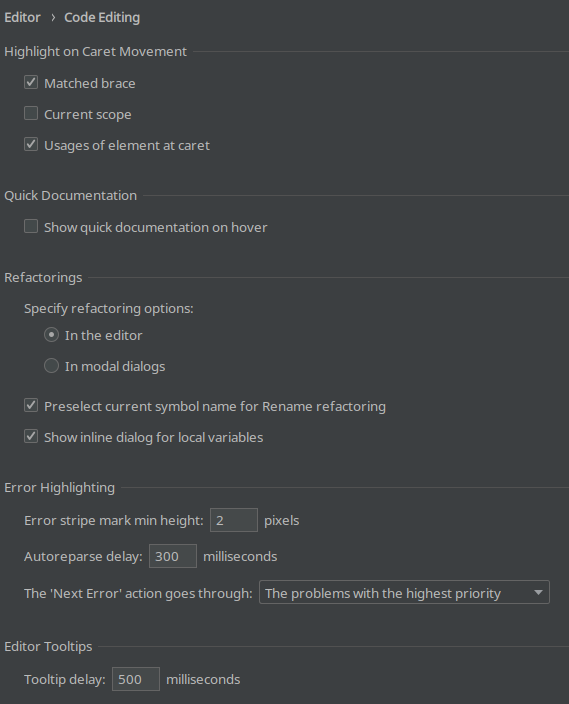
Like a TUI version of stuff like in the picture?

Basically a settings dialog with:

  • all nvim options (in sections)
  • a plugin section with
  • installed plugins
    • toggle
    • configuration options
  • available plugins
147


As much as neovim seems nice, I can't seem to find many resources to actually help start configuring neovim as a beginner. Help is very sparse, and the easiest thing seems to get a premade config, but then there are just too many features, and complexity gets in the way of understanding what's going on

148
149
150


cross-posted from: https://discuss.tchncs.de/post/3813494

Floating LSP windows now use Treesitter highlighting, VimConf 2023, better template strings, inline LSP references, Kitty integration, and Neovim config for Python development

view more: โ€น prev next โ€บ