776
Godot
7249 readers
1 users here now
Welcome to the programming.dev Godot community!
This is a place where you can discuss about anything relating to the Godot game engine. Feel free to ask questions, post tutorials, show off your godot game, etc.
Make sure to follow the Godot CoC while chatting
We have a matrix room that can be used for chatting with other members of the community here
Links
Other Communities
- !inat@programming.dev
- !play_my_game@programming.dev
- !destroy_my_game@programming.dev
- !voxel_dev@programming.dev
- !roguelikedev@programming.dev
- !game_design@programming.dev
- !gamedev@programming.dev
Rules
- Posts need to be in english
- Posts with explicit content must be tagged with nsfw
- We do not condone harassment inside the community as well as trolling or equivalent behaviour
- Do not post illegal materials or post things encouraging actions such as pirating games
We have a four strike system in this community where you get warned the first time you break a rule, then given a week ban, then given a year ban, then a permanent ban. Certain actions may bypass this and go straight to permanent ban if severe enough and done with malicious intent
Wormhole
Credits
- The icon is a modified version of the official godot engine logo (changing the colors to a gradient and black background)
- The banner is from Godot Design
founded 2 years ago
MODERATORS
777
778
779
780
781
782
783
784
I made a pause menu, but there seems to be a "dead square" in the middle of the screen, where it doesn't detect the mouse hovering. The deadzone seems fixed in size and place, moving the menu out of the center makes the problem stop. So, something invisible on top?
Video showing the problem - https://files.catbox.moe/92kr8z.mp4
How the node is set up
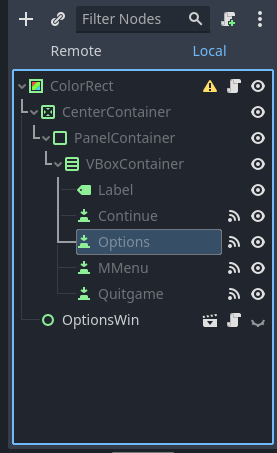
The "OptionsWin" opens a new UI element, but moving it around doesn't change the deadzone, even if none of its elements are anywhere near the original pause menu.
Any ideas on how to fix this without having to offset the pause menu?
EDIT: Fix is my comment below. Should've tested it as an isolate scene first, that led me to looking into the player node and finding the problem. Hopefully this will help someone else in the future.
785
786
787
788
789
50
Liblast - Godot Based Open Source Team Fortress Style Game – GameFromScratch
(gamefromscratch.com)
790
791
792
793
794
795
796
797
798
799
800