Python

7640 readers
31 users here now

Welcome to the Python community on the programming.dev Lemmy instance!

📅 Events

PastNovember 2023

October 2023

July 2023

August 2023

September 2023

🐍 Python project:
💓 Python Community:
✨ Python Ecosystem:
🌌 Fediverse
Communities
Projects
Feeds

founded 2 years ago
MODERATORS
276
277
278
279
280
 
 
281


I started working through the 100 Days of Code course of Udemy last February, and I'm in the home stretch. I'm on the final lessons, which are really just prompts for projects. No hand holding, just a brief description of the goal. I recently finished a tkinter GUI program, the goal of which was to enable adding text watermarks.

I took a few liberties--mainly, I made it possible to layer a png on top of the background. It was a really fun project and quickly grew more complicated than I expected it to. I got some hands on experience with the Single Responsibility Principle, as I started off doing everything in my Layout class.

Eventually, I moved all the stuff that actually involved manipulating the Image objects to an ImageManager class. I feel like I could have gotten even more granular. That's one thing I would love to get some feedback on. How would a more experienced programmer have architected this program?

Anyway, I guess this preamble is long enough. I'm going to leave a link to the repository here. I would have so much appreciation for anyone who took the time to look at the code, or even clone the repo and see if my instructions for getting it to run on your machine work.

Watermark GUI Repo

282


I'm currently learning Python and am learning about very basic functions such as int(), float(), and input().

I have the first two down pat, but I'm struggling to understand the last. The example I'm looking at is found at 12:26 of this video:

nam = input('Who are you? ')
print('Welcome', nam)

Who are you? Chuck
Welcome Chuck

In this case, wouldn't nam be a variable equal to the text on the right side of the = sign?

In which case, if nam is equal to input('Who are you? '), then wouldn't print('Welcome', nam) just result in

Welcome input(Who are you? )?

Obviously not (nor does it work in a compiler), which leads me to believe I'm clearly misunderstanding something. But I've rewatched that section of the video several times, and looked it up elsewhere on the web, and I just can't wrap my head around it.

Could someone help me with this?

Thanks.

283


If I run this

#!/bin/bash

ARCH=$(python fetch_architecture.py)
if [ $ARCH == "aarch64" -o $ARCH == "armv71" ] ; then
    export PATH=/opt/local/llvm/bin:${PATH}
    cd /app
    RUSTFLAGS="-C linker=lld" wasm-pack build --target web --release plume-front
else
    wasm-pack build --target web --release plume-front
fi

via the terminal, it works just fine. But when I run it via the Dockerfile,

COPY . . 
RUN cargo install wasm-pack 
RUN chmod a+x ./script/plume-front.sh 
RUN sleep 1 
RUN ./script/plume-front.sh

It says python: command not found and then [: too many arguments

284


I happen to write a lot of python code dealing with git repositories. Currently I am calling the git command line tool from python and interpret the output.

This solution really doesn't scale well. Can you recommend a python library that wraps git functionality?

I have found three:

  • GitPython: Seems to work well, but it is in maintenance mode, unlikely to be improved. It also does not have any type hints making working with it annoying.
  • pygit2: Seems well supported and has type hints. But it also seems very low level and pretty tedious to use.
  • dulwich: Looks very promising feature wise but I'm unsure how well it is supported. It seems like an ambitious project being largely done by just one person.
285
286


Neato

287
288


Good evening, everyone. I have, but one quick inquiry. What are the best resources in your opinion to learn python by yourself as a complete beginner? Thank you all

289


Solved: Thanks to a user with this reply: https://programming.dev/comment/10034690


cross-posted from: https://beehaw.org/post/13901165

Hi all. I have a little problem and don't know how to solve. A CLI program in Python is broken since Python 3.12. It was working in Python 3.11. The reason is, that Python 3.12 changed how subclassing of a pathlib.Path works (basically fixed an issue), which now breaks a workaround.

The class in question is:

class File(PosixPath):
    def __new__(cls, *args: Any, **kwargs: Any) -> Any:
        return cls._from_parts(args).expanduser().resolve()  # type: ignore

    def __init__(self, source: str | Path, *args: Any) -> None:
        super().__init__()
        self.__source = Path(source)

    @property
    def source(self) -> Path:
        return self.__source

    @property
    def modified(self) -> Time:
        return Time.fromtimestamp(os.path.getmtime(self))

    @property
    def changed(self) -> Time:
        return Time.fromtimestamp(os.path.getctime(self))

    @property
    def accessed(self) -> Time:
        return Time.fromtimestamp(os.path.getatime(self))

    # Calculate sha512 hash of self file and compare result to the
    # checksum found in given file. Return True if identical.
    def verify_sha512(self, file: File, buffer_size: int = 4096) -> bool:
        compare_hash: str = file.read_text().split(" ")[0]
        self_hash: str = ""
        self_checksum = hashlib.sha512()
        with open(self.as_posix(), "rb") as f:
            for chunk in iter(lambda: f.read(buffer_size), b""):
                self_checksum.update(chunk)
            self_hash = self_checksum.hexdigest()
        return self_hash == compare_hash

and I get this error when running the script:

Traceback (most recent call last):
File "/home/tuncay/.local/bin/geprotondl", line 1415, in 
sys.exit(main())
^^^^^^
File "/home/tuncay/.local/bin/geprotondl", line 1334, in main
arguments, status = parse_arguments(argv)
^^^^^^^^^^^^^^^^^^^^^
File "/home/tuncay/.local/bin/geprotondl", line 1131, in parse_arguments
default, status = default_install_dir()
^^^^^^^^^^^^^^^^^^^^^
File "/home/tuncay/.local/bin/geprotondl", line 1101, in default_install_dir
steam_root: File = File(path)
^^^^^^^^^^
File "/home/tuncay/.local/bin/geprotondl", line 97, in __new__
return cls._from_parts(args).expanduser().resolve()  # type: ignore
^^^^^^^^^^^^^^^
AttributeError: type object 'File' has no attribute '_from_parts'. Did you mean: '_load_parts'?

Now replacing _from_parts with _load_parts does not work either and I get this message in that case:

Traceback (most recent call last):
File "/home/tuncay/.local/bin/geprotondl", line 1415, in 
sys.exit(main())
^^^^^^
File "/home/tuncay/.local/bin/geprotondl", line 1334, in main
arguments, status = parse_arguments(argv)
^^^^^^^^^^^^^^^^^^^^^
File "/home/tuncay/.local/bin/geprotondl", line 1131, in parse_arguments
default, status = default_install_dir()
^^^^^^^^^^^^^^^^^^^^^
File "/home/tuncay/.local/bin/geprotondl", line 1101, in default_install_dir
steam_root: File = File(path)
^^^^^^^^^^
File "/home/tuncay/.local/bin/geprotondl", line 97, in __new__
return cls._load_parts(args).expanduser().resolve()  # type: ignore
^^^^^^^^^^^^^^^^^^^^^
File "/usr/lib/python3.12/pathlib.py", line 408, in _load_parts
paths = self._raw_paths
^^^^^^^^^^^^^^^
AttributeError: 'tuple' object has no attribute '_raw_paths'

I have searched the web and don't understand how to fix this. Has anyone an idea what to do?

290


Trey Hunner writes:

This article is primarily meant to act as a Python time complexity cheat sheet for those who already understand what time complexity is and how the time complexity of an operation might affect your code. For a more thorough explanation of time complexity see Ned Batchelder's article/talk on this subject.

Read Python Big O: the time complexities of different data structures in Python

291
292


I have a Keybow MINI hooked up to a Raspberry Pi Zero W, and I'm using Python to respond to events. I have one button that kicks off playing a song on a passive buzzer, and I'm wondering if there's a way to have a button press stop the song before it completes.

293


Many commertial apps have options to run apps at logins... Is there any cross-platform way to do so in python?

294
295


Would love to hear any suggestions, feedback or comments.

296
297
298


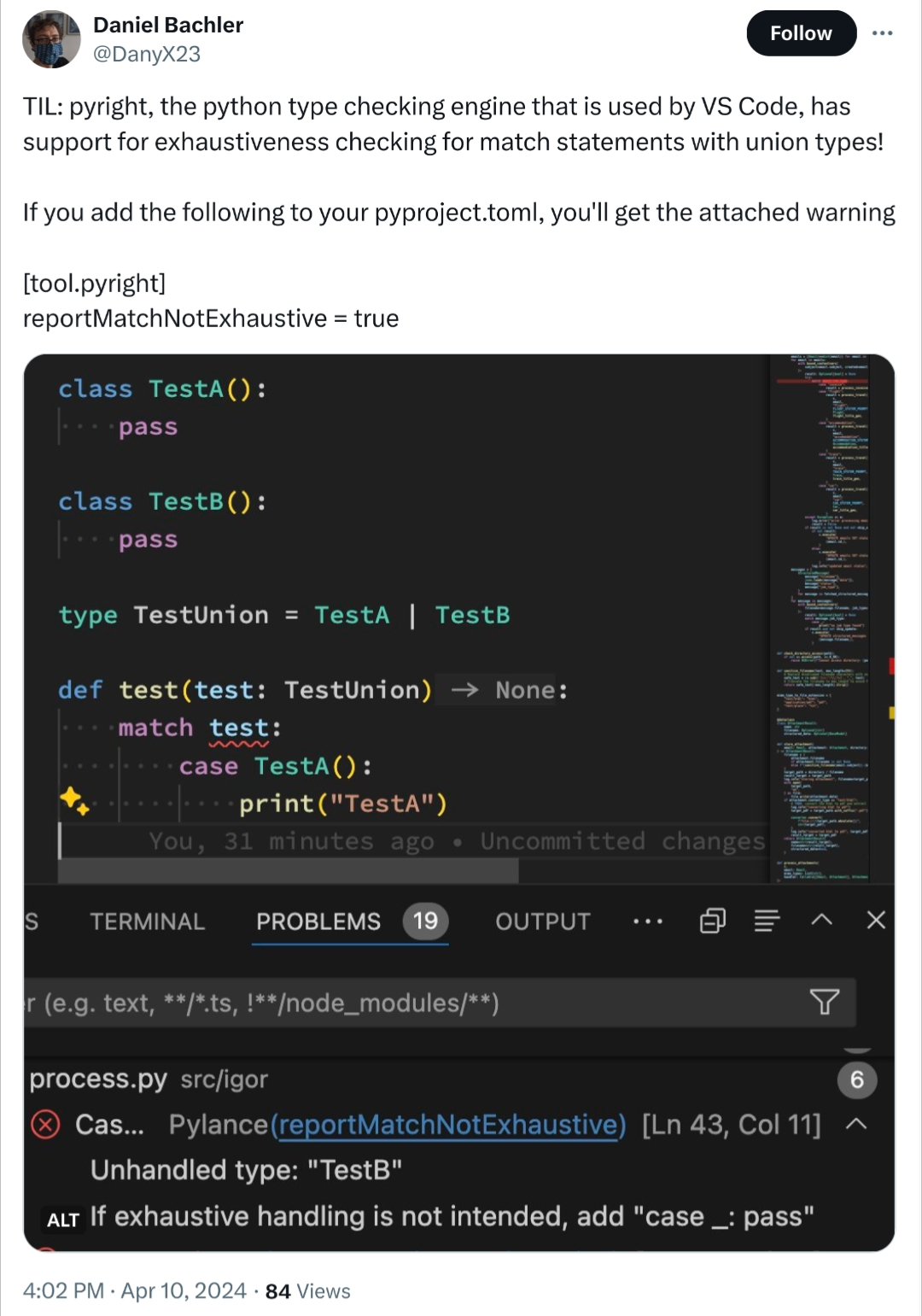
Twitter user @DanyX23:

TIL: pyright, the python type checking engine that is used by VS Code, has support for exhaustiveness checking for match statements with union types!

If you add the following to your pyproject.toml, you'll get the attached warning

[tool.pyright] reportMatchNotExhaustive = true

299


Not sure if this is allowed here, and it's not my playlist, but I thought I'd post these tutorials since I've found them helpful for learning the basics.

300


Hello! I'm attempting to follow some tutorials on unit testing with Python. One of them is a video tutorial Unit Tests in Python on the Socratica channel. Everyone in the comments seems to be making out just fine, and I’m following the instructor’s directions to the letter, yet I get a different result. It’s driving me mad lol.

In the video, the instructor creates two text files, one called circles.py in which she defines a function circle_area(r), and another called test_circles.py in which she writes some unit tests. In my attempt to follow along, I've ended up with two files structured like so:

/home/yo_scottie_oh/Projects/PythonTutorials/Socratica/Circles
├── circles.py
└── test_circles.py

circles.py:

from math import pi

def circle_area(r):
   return pi*(r**2)

# Test function
radii = [2, 0, -3, 2 + 5j, True, "radius"]
message = "Area of circles with r = {radius} is {area}."

for r in radii:
   A = circle_area(r)
   print(message.format(radius=r,area=A))

test_circles.py:

import unittest
from circles import circle_area
from math import pi

class TestCircleArea(unittest.TestCase):
   def test_area(self):
      # Test areas when radius >=0
      self.assertAlmostEqual(circle_area(1),pi)
      self.assertAlmostEqual(circle_area(0),0)
      self.assertAlmostEqual(circle_area(2.1),pi*2.1**2)

Where I'm getting tripped up is at 4:32 in the video, the instructor says to run the unit tests by opening a shell, going to the directory that contains both the circles and test_circles modules, and issuing the following command: python -m unittest test_circles.

Instructor's result (it runs the unit test):

Ran 1 test in 0.000s

OK

My result (it seems to execute circles.py itself):

[yo_scottie_oh@nobara Circles]$ python -m unittest test_circles
Area of circles with r = 2 is 12.566370614359172.
Area of circles with r = 0 is 0.0.
Area of circles with r = -3 is 28.274333882308138.
Area of circles with r = (2+5j) is (-65.97344572538566+62.83185307179586j).
Area of circles with r = True is 3.141592653589793.
Traceback (most recent call last):
  File "<frozen runpy>", line 198, in _run_module_as_main
  File "<frozen runpy>", line 88, in _run_code
  File "/usr/lib64/python3.11/unittest/__main__.py", line 18, in <module>
    main(module=None)
  File "/usr/lib64/python3.11/unittest/main.py", line 101, in __init__
    self.parseArgs(argv)
  File "/usr/lib64/python3.11/unittest/main.py", line 150, in parseArgs
    self.createTests()
  File "/usr/lib64/python3.11/unittest/main.py", line 161, in createTests
    self.test = self.testLoader.loadTestsFromNames(self.testNames,
                ^^^^^^^^^^^^^^^^^^^^^^^^^^^^^^^^^^^^^^^^^^^^^^^^^^
  File "/usr/lib64/python3.11/unittest/loader.py", line 232, in loadTestsFromNames
    suites = [self.loadTestsFromName(name, module) for name in names]
             ^^^^^^^^^^^^^^^^^^^^^^^^^^^^^^^^^^^^^^^^^^^^^^^^^^^^^^^^
  File "/usr/lib64/python3.11/unittest/loader.py", line 232, in <listcomp>
    suites = [self.loadTestsFromName(name, module) for name in names]
              ^^^^^^^^^^^^^^^^^^^^^^^^^^^^^^^^^^^^
  File "/usr/lib64/python3.11/unittest/loader.py", line 162, in loadTestsFromName
    module = __import__(module_name)
             ^^^^^^^^^^^^^^^^^^^^^^^
  File "/home/yo_scottie_oh/Projects/PythonTutorials/Socratica/Circles/test_circles.py", line 4, in <module>
    from circles import circle_area
  File "/home/yo_scottie_oh/Projects/PythonTutorials/Socratica/Circles/circles.py", line 14, in <module>
    A = circle_area(r)
        ^^^^^^^^^^^^^^
  File "/home/yo_scottie_oh/Projects/PythonTutorials/Socratica/Circles/circles.py", line 6, in circle_area
    return pi*(r**2)
               ~^^~
TypeError: unsupported operand type(s) for ** or pow(): 'str' and 'int'
[yo_scottie_oh@nobara Circles]$

I've been banging my head against the wall for hours now trying to figure out why when I execute the same command as the instructor, it appears to execute my Python scripts themselves instead of running the unit tests.

Other things I've tried:

I've read the Python documentation on unit testing. I tried adding this to the end of the test_circles.py document, but that did not change anything.

if __name__ == '__main__':
    unittest.main()

I've tried following this other written tutorial. After I create the text documents and organize them in the separate shapes and tests folders and run the command python -m unittest discover -v, again I get a different result from the author.

Author's result:

test_area (test_circle.TestCircle) ... ok
test_circle_instance_of_shape (test_circle.TestCircle) ... ok
test_create_circle_negative_radius (test_circle.TestCircle) ... ok
test_area (test_square.TestSquare) ... ok
test_create_square_negative_length (test_square.TestSquare) ... ok
test_square_instance_of_shape (test_square.TestSquare) ... ok

----------------------------------------------------------------------
Ran 6 tests in 0.002s

OK

My result:

[yo_scottie_oh@nobara test]$ python -m unittest discover -v
test_circle (unittest.loader._FailedTest.test_circle) ... ERROR
test_square (unittest.loader._FailedTest.test_square) ... ERROR

======================================================================
ERROR: test_circle (unittest.loader._FailedTest.test_circle)
----------------------------------------------------------------------
ImportError: Failed to import test module: test_circle
Traceback (most recent call last):
  File "/usr/lib64/python3.11/unittest/loader.py", line 419, in _find_test_path
    module = self._get_module_from_name(name)
             ^^^^^^^^^^^^^^^^^^^^^^^^^^^^^^^^
  File "/usr/lib64/python3.11/unittest/loader.py", line 362, in _get_module_from_name
    __import__(name)
  File "/home/yo_scottie_oh/Projects/PythonTutorials/PythonUnitTesting/test/test_circle.py", line 4, in <module>
    from shapes.circle import Circle
ModuleNotFoundError: No module named 'shapes'


======================================================================
ERROR: test_square (unittest.loader._FailedTest.test_square)
----------------------------------------------------------------------
ImportError: Failed to import test module: test_square
Traceback (most recent call last):
  File "/usr/lib64/python3.11/unittest/loader.py", line 419, in _find_test_path
    module = self._get_module_from_name(name)
             ^^^^^^^^^^^^^^^^^^^^^^^^^^^^^^^^
  File "/usr/lib64/python3.11/unittest/loader.py", line 362, in _get_module_from_name
    __import__(name)
  File "/home/yo_scottie_oh/Projects/PythonTutorials/PythonUnitTesting/test/test_square.py", line 3, in <module>
    from shapes.square import Square
ModuleNotFoundError: No module named 'shapes'


----------------------------------------------------------------------
Ran 2 tests in 0.000s

FAILED (errors=2)

So yeah… this brings me to my question: What’s the obvious thing that everybody else gets that I'm missing? Is the tutorial outdated? Is it because the instructor is on Windows and I’m on Linux? Why won’t my unit tests run?
view more: ‹ prev next ›