linuxPIPEpower

joined 2 years ago
[–] linuxPIPEpower@discuss.tchncs.de 1 points 8 months ago (1 children)

Ha. have you seen the looneys here on Lemmy asking for signatures?

[–] linuxPIPEpower@discuss.tchncs.de 4 points 8 months ago (1 children)

The point of social platforms is to be social.

[–] linuxPIPEpower@discuss.tchncs.de 9 points 8 months ago (7 children)

Agree. And there are cultural issues in forums that make them really annoying. Some forums like to consolidate topics into mega threads like "if you have questions about xyz go to the xyz mega thread". Then you go there and its a 300 page chronology starting in 2008 of completely disorganized conversation. 20 posts per page with no way to read it more easily.

You could do that on reddit with a pinned post but usually mega threads were at least limited to daily/weekly/monthly instead of indefinite.

[–] linuxPIPEpower@discuss.tchncs.de 0 points 8 months ago (9 children)

It would be solved for people who are primarily interested in tech and gaming. How about bellow challenges?

Gaming is huge so presumably lots of gamers are interested in the wider world, which is not exactly well represented here compared to the major platforms.

And we can't ignore the inherent complexities of federation. If a user signs up to another instance but for some reason that instance (or game 's instance) is blocked by others or even goes offline, then it will be confusing if not ruining of their experience.

someone else can probably give a more comprehensive/correct answer but here is how I understand it. i believe chromium is open source and chrome is mostly chromium but also some proprietary (and therefor unknown) bits are included. whereas firefox is entirely open source, meaning you could compile it yourself and still end up with the same package.

[–] linuxPIPEpower@discuss.tchncs.de 3 points 1 year ago (1 children)

For nonidentical devices you create additional packages prefixed with specific device name. You don’t need to link all packages at once with stow, pass a name of a package to link it alone.uuu

Sooo... I find some way to share the dotfiles directory across devices (rsync, syncthing, git, nextcloud, DAV) then make specific subdirs like this?:

~
  - dotfiles
      - bash-desktop
         dot-bashrc
         dot-bash_profile
      - bash-laptop
         dot-bashrc
         dot-profile
         dot-bash_profile

But what is the software doing for me? I'm manually moving all these files and putting them together in the specific way requested. Setting the whole thing up is most of the work. Anyone who can write a script to create the structure can just as easily write it to make symlinks. I'm sure I'm missing something here.

[–] linuxPIPEpower@discuss.tchncs.de 3 points 1 year ago (1 children)

yadm is the one I liked the best and tried it a few times. fact is that I am unlikely to keep a repo like this even part way up to date. New files are created all the time and not added, old ones don't get updated or removed. There's not even a good way to notice in any file manager what is included and what's not as far as I know. yadm doesn't work with tools like eza which can display the git status of files in repos. (and it probably wouldn't be feasible.)

Plus I have some specific config collections already in change tracking and it makes more sense to keep it that way. Having so many unrelated files together in one project is too chaotic and distracting.

It's not realistic for me to manage merges, modules, cherry picking, branches all that for so many files that change constantly without direct intervention. Quickly enough git will tie itself into some knot and I won't be able to pick it apart.

Ya you're right I am thinking "partial upgrade"; I just thought the concept might generalize.

I guess the worst that could happen with a partial install would be some deps installed in the system but then not actually required.

I used to use floccus and the thing I really liked is you can selectively share bookmark groups. So if you have certain links you want everywhere you can do that, but some sets you might only want in in specific browsers. I do not know if the others that have this.

Stopped using it because of unresolvable problems and not much Dev attention but looks like its picked up again so I plan to get back to it.

I agree. Chromebooks are a viable choice for those who want a web terminal. I used one for about a year. Got the job done.

thanks for all the details! I've fairly recently done an FS migration that entailed moving all data, reformatting, and moving it all back. Mega pain in the ass. I know more now than I did at the start of that project, so wouldn't be as bad but not getting into something like that lightly.

Though it might be the excuse I need to buy another 12 tb hdd...

TBD

I've been struggling with syncthing for a few weeks... It runs super hot on every device. Need to figure out how to chill it out a bit.

Other than that I'll look at both NFS and WebDAV some more. Then will come back to this page to re read the more intricate suggestions.


I really like advance find and replace in kate editor. You can optionally use regex and operate on multiple files.

Very importantly it has a robust preview changes ability. it is comfortable to use even with lots of hits, lots of files. So you do not need to apply a bunch of changes and hope you considered every permutation as with a cli tool like sed.

One thing that would really improve my life would be a tool like this which allows you to save search queries and options.

Don't work for me:

  • Kate has a popup for history in the fields which is somewhat helpful but limited. When trying out different queries you don't have a way to remember which one actually worked so going by the history just ends in repeating the same errors over and over. Also it doesn't match the "find" and "replace" fields nor does it associate them with the other options like directory, etc.

  • Keeping notes in a text file is of course possible but cumbersome. I would like the computer to do work like that for me.

For single file searches regex101.com (non floss) and regexr.com (GPLv3) are great in-browser tools for learning and you can save the search. But to operate locally on many files, it doesn't work.

Does anyone know any tools that do anything like this? Can find various utilities which operate on file names but I am looking for file content. Certainly this exists ya?

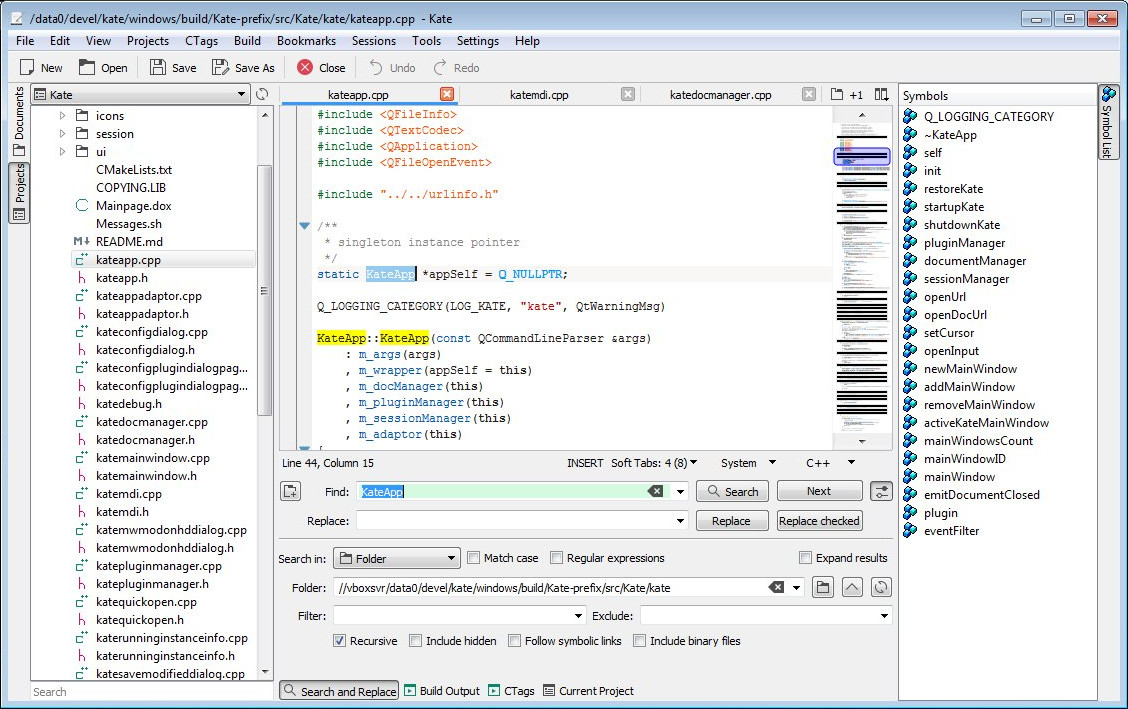
(Post image is screenshot from Kate website of Kate on windows.)
 

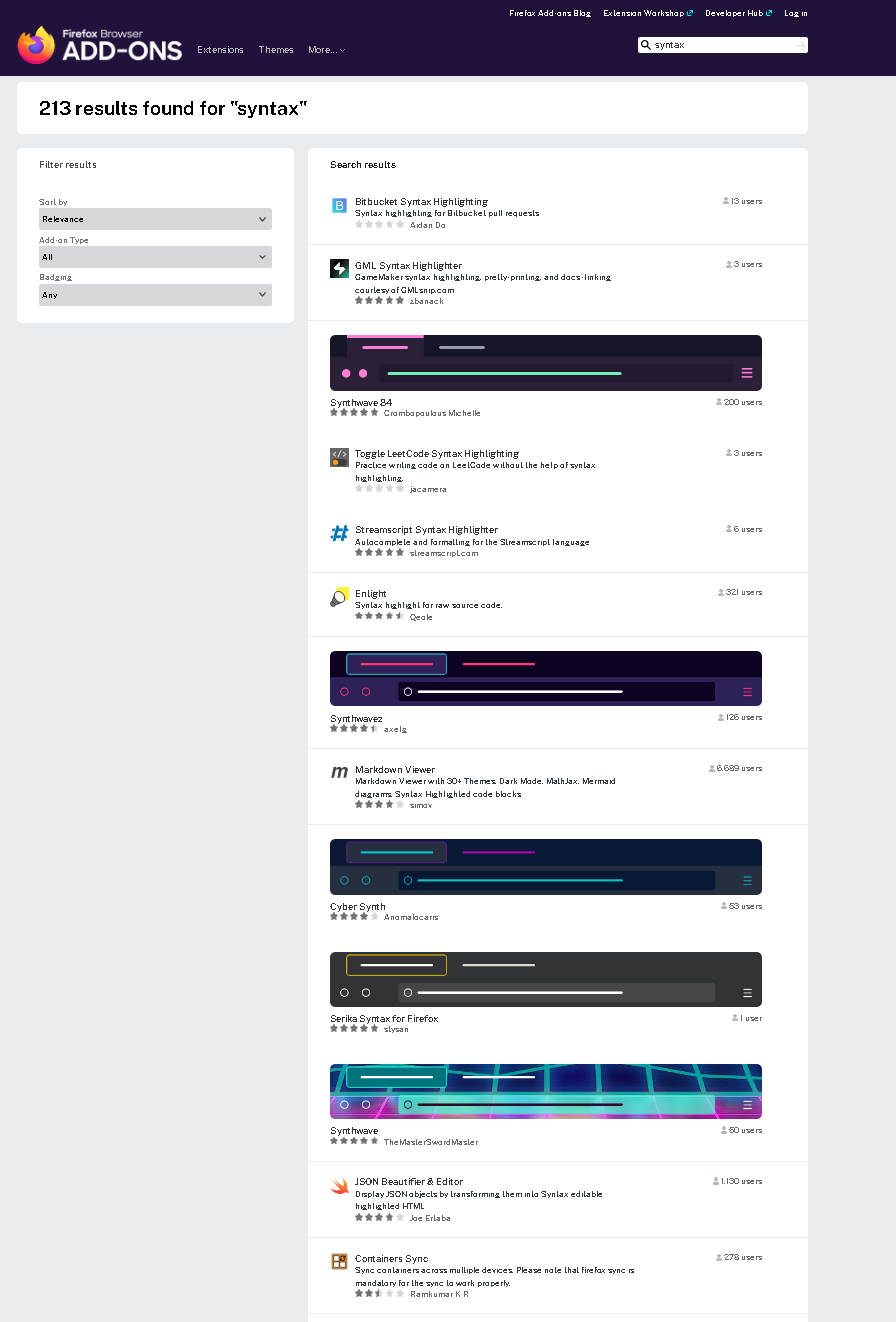
Anytime I search for an addon via the search box in settings > add-ons manager I get all these theme results. Here is a search for "syntax" (via the add-ons manager) I had to make it very zoomed-out to fit long page into screen cap:

I use themes personally to visually differentiate between profiles. And I have nothing against fun and frivolous user customizations. Am not hating on the concept.

I am curious about why they are so aggressively pushed so that they show up be default when trying to search for add ons you need to toggle off every time. Searching for an add-on to do something and searching for a theme that has some keyword included seem to me like totally different tasks and mixing them up is a strange choice.

Is this like a major things firefox thinks people like about it? Do people like it?


I am learning some bash scripting.

I am interested to learn about getting input for my scripts via a GUI interface. It seems that yad (forked from zenity) is the most robust tool for this. (But if there is a better choice I would like to hear about it too.)

Is it possible to obtain 2 or more named variables using yad? Not just getting the values based on their positions ($1, $2, etc), with awk. See "What doesn't work" spoiler for those.

What doesn't workI find how to obtain one named variable, for example:

inputStr=$(zenity --entry --title="My Title" --text="My Text:")

I also find solutions relying on opening single-variable dialogues sequentially but that's a terrible interface.

Everything else relies on chopping up the output with awk or based on the positions, $1, $2, $3 etc. In this script $jpgfile is obtained:

jpgfile=$(echo $OUTPUT | awk 'BEGIN {FS="," } { print $1 }')

This seems unmanageable because adding a new field or failing to provide input for a field will both change the output order of every subsequent value. It's way too fragile.

For a simple example, I want to ask the user for a file name and some content. Creating the dialogue is like this:

yad --title "Create a file" --form --field="File name" --field="Content"

If you fill both fields the output in the terminal is file|this is some text|. How do I get them into variables like $filename and $filecontent? So then I can finish the script like this:

touch "$filename"
echo "$filecontent" > $filename

Is this possible??? I do not find it anywhere. I looked though all kinds of websites like YAD Guide, yad man page, smokey01. Maybe I missed something. On yaddemo I read about bash arrays and it seemed to come close but I couldn't quite piece it together.


cross-posted from: https://discuss.tchncs.de/post/9585677

My dream: I want a way to arbitrarily close and later open groups of applications including their states such as open files, window arrangement, scrollback, even undo histories etc. So working on a specific project I can close everything neatly and return to it later.

In my research/experiments here is what I come up with, do you agree?:

  1. in the terminal-only environment this would be tmux or another multiplexer

  2. But when you start including GUI applications (which I must), then it is something else that doesn't exactly exist

  3. Applications store their current states in a variety of places and some of them don't really do restoring in any way so it would be hard to force.

  4. the best option for this is something like xpra where you can have multiple sessions. If you had a machine that stayed powered-on all the time it might be possible to create sessions, log in remotely and use them that way.

  5. Using xpra or similar the sessions are never really actually closed. You would only close the connection from the local machine. If the machine faces a power off then too bad. As far as I can se there is basically no way to accomplish this goal where power-offs are accommodated.

I have tried some remote-login options but they are too slow for normal use. I tend to have pretty low-end hardware running (because so far it works for most things) so maybe if I upgraded it would improve.

  1. is it plausible?
  2. how to estimate hardware/performance needs of host, client and LAN? anything else to consider?

I typically use manjaro + XFCE but would be willing to try something different to accomplish the goal. I only want to do this locally on LAN not remotely.

re XFCE session managerXFCE has session management but the majority of programs don't totally work with. Like maybe the application will re-open when the session is restored but no files will be open even if they were when session was saved. Or distribution through workspaces, window size etc will not be restored.


My dream: I want a way to arbitrarily close and later open groups of applications including their states such as open files, window arrangement, scrollback, even undo histories etc. So working on a specific project I can close everything neatly and return to it later.

In my research/experiments here is what I come up with, do you agree?:

  1. in the terminal-only environment this would be tmux or another multiplexer

  2. But when you start including GUI applications (which I must), then it is something else that doesn't exactly exist

  3. Applications store their current states in a variety of places and some of them don't really do restoring in any way so it would be hard to force.

  4. the best option for this is something like xpra where you can have multiple sessions. If you had a machine that stayed powered-on all the time it might be possible to create sessions, log in remotely and use them that way.

  5. Using xpra or similar the sessions are never really actually closed. You would only close the connection from the local machine. If the machine faces a power off then too bad. As far as I can se there is basically no way to accomplish this goal where power-offs are accommodated.

I have tried some remote-login options but they are too slow for normal use. I tend to have pretty low-end hardware running (because so far it works for most things) so maybe if I upgraded it would improve.

  1. is it plausible?
  2. how to estimate hardware/performance needs of host, client and LAN? anything else to consider?

I typically use manjaro + XFCE but would be willing to try something different to accomplish the goal. I only want to do this locally on LAN not remotely.

re XFCE session managerXFCE has session management but the majority of programs don't totally work with. Like maybe the application will re-open when the session is restored but no files will be open even if they were when session was saved. Or distribution through workspaces, window size etc will not be restored.


I am really struggling to replace facebook messenger / whatsapp for a few casual conversations. My friends and I are all wanting to move away. We are not heavy users of this but need it to work. I think the requirements are:

  • floss client for android, linux, windows

  • persistent history across devices

  • reasonable security

  • don't need to self host server

  • can send a message to offline user, they get it when they come online

  • not tied to or reliant on phone number / cell service

  • ETA: end user documentation explaining how to set up and common troubleshooting

tried:

  • matrix: the thing with having to keep track of room keys and stuff is too complicated. every time someone uses a new device it is a ton of issues and we could never quite get it ironed out

  • signal: tied to phone number, no history across devices

  • xmpp: similar to matrix the key situation is confusing, also no cross device history

  • ETA: simpleX: a lot of people here are mentioning simpleX. It didn't come up in previous investigations so will give it a shot.

    • ETA 2: It doesn't seem to have persistent history across devices. Clarification?

I actually didn't think this would be such a problem but it is breaking us. we don't need a lot of sophisticated features like voice, video, moderation, 1000s of participants, spam protection etc that seem to be of concern to the projects. just simple text chat.


I really like comparison tables on wikipedia but find them hard to navigate.

For example: Comparison of web browsers > General Information

Say I want a web browser for Linux which has been recently updated. I can sort by the "Platform" column, or by "Latest release: Date" but not both.

Sometimes tables can be very wide and/or very tall. Once you get to scrolling it is impossible to see either the row or column headings. So then you can't tell where you even are in the table. Example: Table of AMD processors Also they can have complex structures with merged headings and content.

Ideally I would like to apply some basic spreadsheet-type operations like hiding rows/columns, filtering, sorting by multiple columns etc. Even if there was a way to easily get the table into an actual spreadsheet that would be helpful. I tried some extensions that export tables to other formats but nothing worked without a lot of cleanup.

Is there some kind of trick or tool or extension that makes these ginormous tables useful? I can't tell how people even add information to these things, they are so large.


I really like comparison tables on wikipedia but find them hard to navigate.

For example: Comparison of web browsers > General Information

Say I want a web browser for Linux which has been recently updated. I can sort by the "Platform" column, or by "Latest release: Date" but not both.

Sometimes tables can be very wide and/or very tall. Once you get to scrolling it is impossible to see either the row or column headings. So then you can't tell where you even are in the table. Example: Table of AMD processors Also they can have complex structures with merged headings and content.

Ideally I would like to apply some basic spreadsheet-type operations like hiding rows/columns, filtering, sorting by multiple columns etc. Even if there was a way to easily get the table into an actual spreadsheet that would be helpful. I tried some extensions that export tables to other formats but nothing worked without a lot of cleanup.

Is there some kind of trick or tool or extension that makes these ginormous tables useful? I can't tell how people even add information to these things, they are so large.


I really like comparison tables on wikipedia but find them hard to navigate.

For example: Comparison of web browsers > General Information

Say I want a web browser for Linux which has been recently updated. I can sort by the "Platform" column, or by "Latest release: Date" but not both.

Sometimes tables can be very wide and/or very tall. Once you get to scrolling it is impossible to see either the row or column headings. So then you can't tell where you even are in the table. Example: Table of AMD processors Also they can have complex structures with merged headings and content.

Ideally I would like to apply some basic spreadsheet-type operations like hiding rows/columns, filtering, sorting by multiple columns etc. Even if there was a way to easily get the table into an actual spreadsheet that would be helpful. I tried some extensions that export tables to other formats but nothing worked without a lot of cleanup.

Is there some kind of trick or tool or extension that makes these ginormous tables useful? I can't tell how people even add information to these things, they are so large.

view more: ‹ prev next ›