pwshguy

joined 2 years ago
MODERATOR OF
 

Announcements!

Blogs, Articles, and Posts

Projects, Scripts, and Modules

  • PSZoom v 2.0.4.2
    A collection of Powershell tools to interface with the Zoom Api.
  • Get Microsoft 365 License Usage Count Using PowerShell
    Keeping an eye on the available licenses in your Microsoft tenant is essential to ensuring you and your users have what is needed to keep the business running. Whether you assign licenses directly or you use Group Based Licensing

Community

  • Emil Larsson: Creating Communal Tech Waves with PowerShell
    In this episode of the PowerShell Podcast, we had Emil Larsson join us! We had a healthy amount of community blogs in this episode, with lots of great conversation all throughout. We discussed how helpful contributing to PowerShell docs can be. We learned about Emil's evolution with PowerShell and how the industry has changed in his 10+ years of experience. Emil and Andrew revisited their early IT days of grappling with upgrades from Windows XP to Windows 7, making all of us a bit nostalgic. We also had a fair bit of discussion around what the PowerShell community is all about.

Fun

Check out psweekly.dowst.dev for all past editions as well as a searchable archive.
 

If you are like me and have multiple machines you work on with different profiles, it can be difficult to remember which profile contains which functions. So, I wrote a quick function that will display all the functions for me on start up.


Azure Automation Run As Account will retire on September 30, 2023 and will be replaced with Managed Identities. Before that date, you'll need to migrate your runbooks to use managed identities.

However, just the presence of a Run As account doesn’t mean a it is being used. Often these were just created during the automation account provisioning. This script help to determine if you are using the Run As account by search through the runbooks to find references to the Run As Account actually being called. Then finds the last time the runbook was executed. If no date is returned, then the runbook has not executed in the last 30 days.


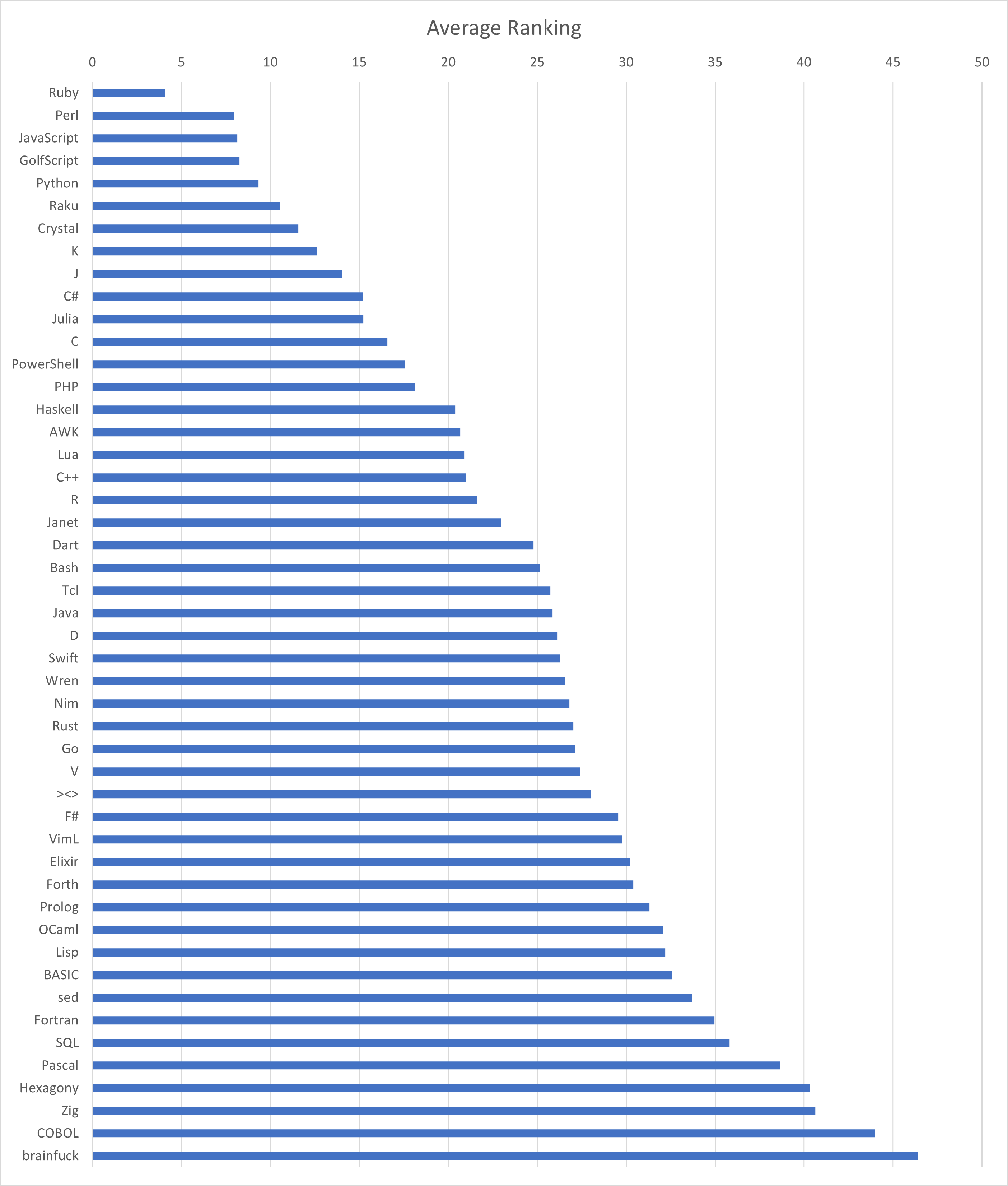
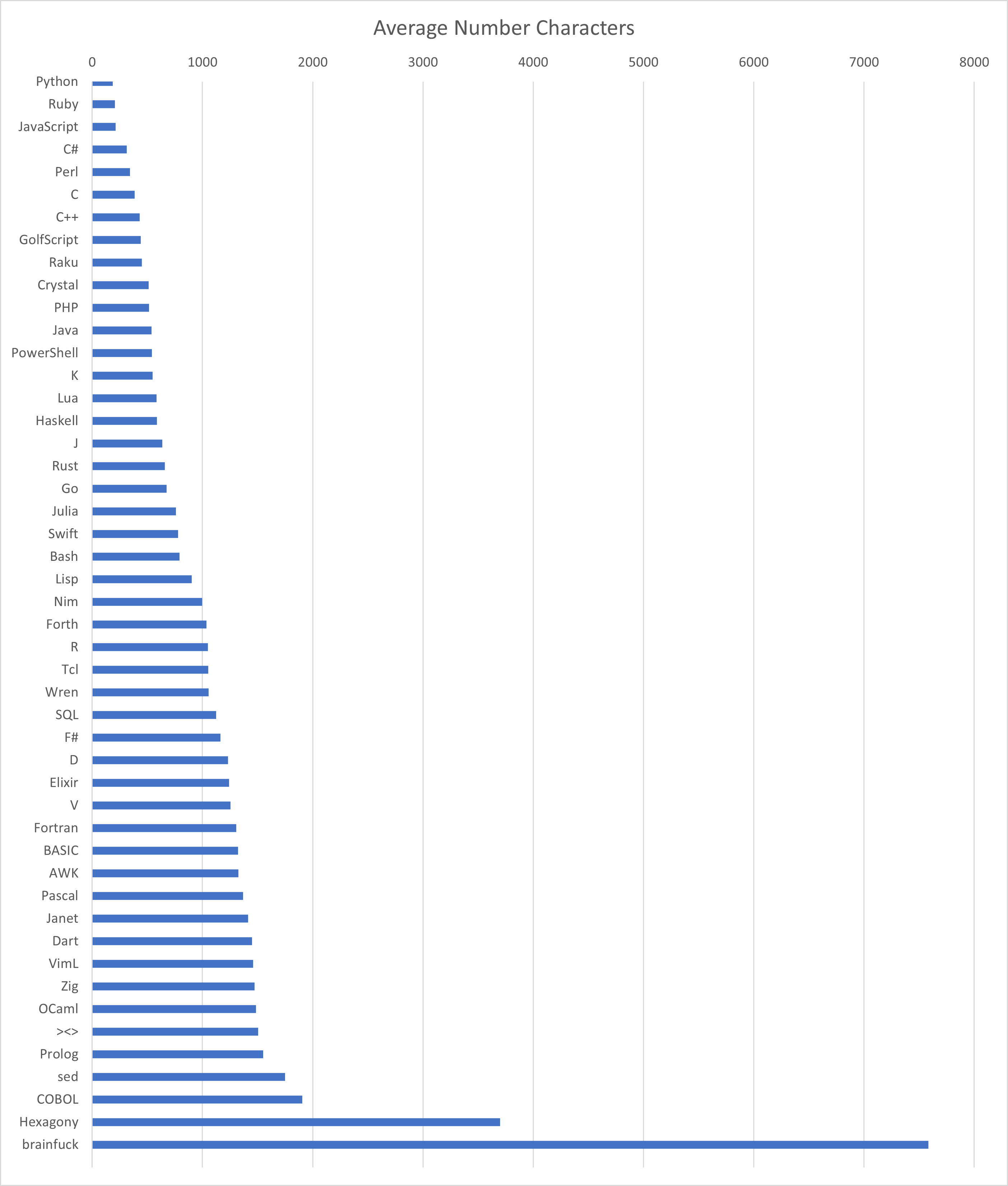
I was looking at code.golf the other day and I wondered which languages were the least verbose, so I did a little data gathering.

I looked at 48 different languages that had completed 79 different code challenges on code.golf. I then gathered the results for each language and challenge. If a "golfer" had more than 1 submission to a challenge, I grabbed the most recent one. I then dropped the top 5% and bottom 5% to hopefully mitigate most outliers. Then came up with an average for each language, for each challenge. I then averaged the results across each language and that is what you see here.

For another perspective, I ranked each challenge then got the average ranking across all challenges. Below is the results of that.

Disclaimer: This is in no way scientific. It's just for fun. If you know of a better way to sort these results please let me know.


Enums were introduced to PowerShell in version 5.0 and can be used as a simple way to validate script and parameter input.


Go beyond comment-based help. Bring your own module and learn how to create the documentation to support it.


Announcements!

Blogs, Articles, and Posts

  • Find enabled local Group Policy settings with rsop.msc and PowerShell
    When it comes to GPO troubleshooting, you might want to find settings that are configured by local Group Policy. With rsop.msc, a graphical tool is available for this purpose. However, it is generally more efficient to generate a report using gpresult.exe and evaluate it with PowerShell.
  • Your Getting Started Guide to PowerShell Approved Verbs
    Discover how to get started with PowerShell Approved Verbs to make sure your scripts and code is top-notch in this ATA Learning tutorial!
  • How to optimize and speed up your PowerShell scripts
    My best practices, tips and tricks working with PowerShell This is a blog post that is not deeply technical. I will not go deep into the tips and tricks, because you will learn this automatically when you have more experience & when you are ready. I have a seperate blog post about best practices, tips … Continue reading How to optimize and speed up your PowerShell scripts
  • PowerShell Advanced Functions: Cmdlet Bindings and Parameters
    Part 1 of this series on advanced PowerShell functions introduces the key concepts, including cmdlet bindings and common parameters like ErrorAction.

Projects, Scripts, and Modules

  • Announcing PowerShell Crescendo 1.1.0-RC1
    This RC contains several community requested features and fixes including improved support for PSScriptAnalyzer, improvements to error handling, and the addition of ExcludeAsArgument property.
  • Using the Microsoft Graph PowerShell SDK to Generate a Mailbox Traffic Report
    Microsoft 365 makes it easy for administrators to get mail activity usage data for users. However, if you want to know which domains are sending most mail, you need to do some work. In this article, we cover how to use cmdlets from the Microsoft Graph PowerShell SDK to create reports about user mail activity over time and the traffic sent by different domains.
  • ServerCertificateValidationCallback (or rather, collector) for .NET Core
    ServerCertificateValidationCallback (or rather, collector) for .NET Core - Get-WebCertificate.ps1
  • About Colors.md
    When I'm having a bad day, I can spend hours just fiddling with colors and recursion. Today I wrote an HslEnumerator class which is fun because if you output it to the PowerShell terminal it just goes on producing colors forever:
  • Get-AadJoinInformation.ps1
    Get Azure AD (Entra ID) Join Information without dsregcmd

Books, Media, and Learning Resources

  • From Cloud to Console: Harm Veenstra’s PowerShell Perspectives
    We had a cool chat with Harm Veenstra, the guy behind powershellisfun.com. We got into some neat PowerShell stuff like Out-ConsoleGridView and the -PassThru parameter. Harm also gave us the lowdown on when to quit the cloud and spilled the beans on running his blog. Plus, he shared how he keeps up with the quick mojo of the tech world. Tune in for a fun and laid-back tech talk!

Community

Fun

  • PSQuizMaster
    A module for creating and running quizzes to learn PowerShell - GitHub - jdhitsolutions/PSQuizMaster: A module for creating and running quizzes to learn PowerShell

Check out psweekly.dowst.dev for all past editions as well as a searchable archive.
 

Blogs, Articles, and Posts

  • Create a Hyper-V VM to run pfSense with a PowerShell script
    In this blog post, you’ll learn how to use a PowerShell script to create a Hyper-V virtual machine (VM) toContinue Reading
  • Function cannot be created because function capacity 4096 has been exceeded for this scope
    I had a long day today when my long-running script (10 hours) gave me weird errors with Microsoft Graph for Teams. Finally, I solved my mistakes and reran the hand to see if the report would be complete this time. Surprisingly, it gave me an error I'd never seen before. "Function cannot be created because function capacity 4096 has been exceeded for this scope". The error is at least weird because it's shown on a production server where I've just a handful of PowerShell modules installed, and I've never seen it on my development machine where I've over 200 modules.
  • Things I use most in my PowerShell scripts
    Looking back at the scripts I created the last year, certain things always come back in most of them. In this blog post, I will show you a few and explain them.
  • Find Who Created a User Account in Microsoft 365 | Audit User Creations 
    In Microsoft 365, user accounts act as gateways to access resources. Unauthorized or suspicious user creations can lead to severe consequences, such as data breaches and compromises in sensitive information. Admins play a critical role in safeguarding organizational data by […]
  • Ask Jeff July 2023
    Well, this has been a whirlwind month. I hope you accomplished much and still had time to learn a thing or two. As has been the custom here, let’s wrap up with grab bag of tips and suggestions.

Projects, Scripts, and Modules

Community

  • Björn Sundling. From PowerShell Developer to MVP: An Unfiltered Journey
    In our latest PowerShell Podcast, we invited Microsoft MVP Björn Sundling,  on a riveting journey from being a PowerShell developer to securing Azure DevOps repositories. With a passion for speaking seeded from his first year at PSConfEU 2015, his road to the podium wasn’t easy. The podcast was peppered with a detailed discussion on the automated scanner project PSSecretScanner. Offering insights into development technologies, this episode is a whirlwind tour of community involvement and encompasses his love of sharing knowledge.

Fun

  • Become the TEC 2023 PowerShell Script-Off Champion
    The TEC 2023 PowerShell Challenge Champion will be known after three rounds of frenetic script coding at The Experts Conference in Atlanta on September 19, 2023. Competitors will need a working knowledge of Microsoft 365 PowerShell, including Exchange Online, Teams, and Azure AD. Being able to think on your feet and come up with working solutions to problems is possibly a more important attribute than coding genius.

Events

Check out psweekly.dowst.dev for all past editions as well as a searchable archive.


Blogs, Articles, and Posts

Projects, Scripts, and Modules

Books, Media, and Learning Resources

Community

  • Culture, Mentoring, and Tech: A Talk with Glen Sarti
    In this episode of the PowerShell Podcast, Glen leads us on the journey of his wide-ranging career, sharing stories about his beginnings in the Powershell world and addressing his brave decision to move across the globe for his dreams. He unravels the complex world of DevOps, recounts experiences from his first talk on “DevOps, Desktop, and Odd Socks,” and offers valuable insights into building effective mentoring relationships. At the heart of the episode is his take on driving cultural change within organizations and his compelling comparison of technical versus social skills in the tech industry. This episode encapsulates numerous nuggets of wisdom from Glen, adding value and insights for listeners at all stages of their tech career.

Fun

  • Posh v0.1.1
    Posh is a PowerShell module that makes PowerShell more fun to work with.

Check out psweekly.dowst.dev for all past editions as well as a searchable archive.

 
view more: ‹ prev next ›