Fisch

joined 2 years ago
MODERATOR OF
[–] Fisch@discuss.tchncs.de 13 points 14 hours ago (1 children)

Mine has LineageOS anyway

[–] Fisch@discuss.tchncs.de 5 points 1 week ago (1 children)

Baddie as in bad guys or as in slay queen?

[–] Fisch@discuss.tchncs.de 1 points 1 week ago (1 children)

I have Stalwart installed and use an SMTP relay too. I can send and receive email just fine, never had an issue with that. The only thing that doesn't really work is the account setup (when you add your account to an email client). It doesn't detect the settings, so I have to add them manually and I have to ignore the certificate warning but maybe I'll get around to fixing it someday.

[–] Fisch@discuss.tchncs.de 6 points 3 weeks ago (9 children)

It makes sense why it is like that, at least in countries that were part of the Soviet Union. They wanted to build housing for everyone that still gave them a good quality of life. In order to do that quickly, they focused on making them nice on the inside while not really caring for what they looked like on the outside. They used new techniques (I don't remember if they invented them or if that was already a thing) to mass produce parts for the houses beforehand, so they only needed to assemble them and didn't need to put a lot of work into designing each building.

[–] Fisch@discuss.tchncs.de 47 points 1 month ago (2 children)

What freaky ass bible are you reading? 😭

[–] Fisch@discuss.tchncs.de 1 points 1 month ago

I wasn't using hyperbole and I specifically added this at the end:

(at least nothing you can see)

I know that it's installing but as a user, I don't really see anything happen or any indication of the progress. I just have to wait for some amount of time without any idea of how long I will have to wait. That makes it feel so long.

And don't call me an idiot for doing something I never did. I don't even know what you misinterpreted. This whole post is about how the time it takes to install an app was reduced and I shared my own experience to show why I think that's a very good change. In response, you told me that an app has to be installed after downloading it. I never said that that wasn't the case, so I didn't understand what point you were trying to make, which is why I asked you.

[–] Fisch@discuss.tchncs.de 1 points 1 month ago (2 children)

Yes, I know but why are you telling me that?

[–] Fisch@discuss.tchncs.de 1 points 1 month ago

I just said it's annoying and making that waiting time shorter is a good change

[–] Fisch@discuss.tchncs.de 2 points 1 month ago (4 children)

I know, what's your point?

[–] Fisch@discuss.tchncs.de 7 points 1 month ago (2 children)

Hi maybe Michael

[–] Fisch@discuss.tchncs.de 4 points 1 month ago

Did you install it using Steam?

[–] Fisch@discuss.tchncs.de 20 points 1 month ago (5 children)

My name is not Micheal 🤔


cross-posted from: https://discuss.tchncs.de/post/21001865

I just installed Piped using podman-compose but when open up the frontend in my browser, the trending page is just showing the loading icon. The logs aren't really helping, the only error is in piped-backend:

java.net.SocketTimeoutException: timeout
	at okhttp3.internal.http2.Http2Stream$StreamTimeout.newTimeoutException(Http2Stream.kt:675)
	at okhttp3.internal.http2.Http2Stream$StreamTimeout.exitAndThrowIfTimedOut(Http2Stream.kt:684)
	at okhttp3.internal.http2.Http2Stream.takeHeaders(Http2Stream.kt:143)
	at okhttp3.internal.http2.Http2ExchangeCodec.readResponseHeaders(Http2ExchangeCodec.kt:97)
	at okhttp3.internal.connection.Exchange.readResponseHeaders(Exchange.kt:110)
	at okhttp3.internal.http.CallServerInterceptor.intercept(CallServerInterceptor.kt:93)
	at okhttp3.internal.http.RealInterceptorChain.proceed(RealInterceptorChain.kt:109)
	at okhttp3.internal.connection.ConnectInterceptor.intercept(ConnectInterceptor.kt:34)
	at okhttp3.internal.http.RealInterceptorChain.proceed(RealInterceptorChain.kt:109)
	at okhttp3.internal.cache.CacheInterceptor.intercept(CacheInterceptor.kt:95)
	at okhttp3.internal.http.RealInterceptorChain.proceed(RealInterceptorChain.kt:109)
	at okhttp3.internal.http.BridgeInterceptor.intercept(BridgeInterceptor.kt:83)
	at okhttp3.internal.http.RealInterceptorChain.proceed(RealInterceptorChain.kt:109)
	at okhttp3.internal.http.RetryAndFollowUpInterceptor.intercept(RetryAndFollowUpInterceptor.kt:76)
	at okhttp3.internal.http.RealInterceptorChain.proceed(RealInterceptorChain.kt:109)
	at okhttp3.internal.connection.RealCall.getResponseWithInterceptorChain$okhttp(RealCall.kt:201)
	at okhttp3.internal.connection.RealCall.execute(RealCall.kt:154)
	at me.kavin.piped.utils.RequestUtils.getJsonNode(RequestUtils.java:34)
	at me.kavin.piped.utils.matrix.SyncRunner.run(SyncRunner.java:97)
	at java.base/java.lang.VirtualThread.run(VirtualThread.java:329)

Would appreciate it if anyone could help me. I also wasn't sure what info to include, so please ask if there's any more info you need.

9
submitted 1 year ago* (last edited 1 year ago) by Fisch@discuss.tchncs.de to c/piped@feddit.rocks
 

I just installed Piped using podman-compose but when I open up the frontend in my browser, the trending page is just showing the loading icon. The logs aren't really helping, the only error is in piped-backend:

java.net.SocketTimeoutException: timeout
	at okhttp3.internal.http2.Http2Stream$StreamTimeout.newTimeoutException(Http2Stream.kt:675)
	at okhttp3.internal.http2.Http2Stream$StreamTimeout.exitAndThrowIfTimedOut(Http2Stream.kt:684)
	at okhttp3.internal.http2.Http2Stream.takeHeaders(Http2Stream.kt:143)
	at okhttp3.internal.http2.Http2ExchangeCodec.readResponseHeaders(Http2ExchangeCodec.kt:97)
	at okhttp3.internal.connection.Exchange.readResponseHeaders(Exchange.kt:110)
	at okhttp3.internal.http.CallServerInterceptor.intercept(CallServerInterceptor.kt:93)
	at okhttp3.internal.http.RealInterceptorChain.proceed(RealInterceptorChain.kt:109)
	at okhttp3.internal.connection.ConnectInterceptor.intercept(ConnectInterceptor.kt:34)
	at okhttp3.internal.http.RealInterceptorChain.proceed(RealInterceptorChain.kt:109)
	at okhttp3.internal.cache.CacheInterceptor.intercept(CacheInterceptor.kt:95)
	at okhttp3.internal.http.RealInterceptorChain.proceed(RealInterceptorChain.kt:109)
	at okhttp3.internal.http.BridgeInterceptor.intercept(BridgeInterceptor.kt:83)
	at okhttp3.internal.http.RealInterceptorChain.proceed(RealInterceptorChain.kt:109)
	at okhttp3.internal.http.RetryAndFollowUpInterceptor.intercept(RetryAndFollowUpInterceptor.kt:76)
	at okhttp3.internal.http.RealInterceptorChain.proceed(RealInterceptorChain.kt:109)
	at okhttp3.internal.connection.RealCall.getResponseWithInterceptorChain$okhttp(RealCall.kt:201)
	at okhttp3.internal.connection.RealCall.execute(RealCall.kt:154)
	at me.kavin.piped.utils.RequestUtils.getJsonNode(RequestUtils.java:34)
	at me.kavin.piped.utils.matrix.SyncRunner.run(SyncRunner.java:97)
	at java.base/java.lang.VirtualThread.run(VirtualThread.java:329)

Would appreciate it if anyone could help me. I also wasn't sure what info to include, so please ask if there's any more info you need.

 

cross-posted from: https://discuss.tchncs.de/post/20956700

All the public Piped instances are getting blocked by YouTube but do small selfhosted instances, that are only used by a handful of users or just yourself, still working? Thinking of just selfhosting it.

On a side note, if I do it, I'd also like to install the new EFY redesign or is that branch too far behind?


All the public Piped instances are getting blocked by YouTube but do small selfhosted instances, that are only used by a handful of users or just yourself, still working? Thinking of just selfhosting it.

On a side note, if I do it, I'd also like to install the new EFY redesign or is that branch too far behind?

Edit: As you can see in the replies, private instances still work. I also found the instructions for running the new EFY redesign here


You need to hold down fn1 + page up for a few seconds until the keyboard flashes red, then let go of the keys. Now you can use page up as the print screen key. If you hold down fn1 + page up for a few seconds again, it will go back to working as the page up key.

Just had to search this up and found out how to do this from a Reddit post, so I thought I'd put this information on here as well.

44
Hatsune Miku (infosec.pub)
submitted 1 year ago* (last edited 1 year ago) by Fisch@discuss.tchncs.de to c/animewallpapers@ani.social
 

Source: https://w.wallhaven.cc/full/p9/wallhaven-p91xd3.jpg

Resolution is kinda low, I'll try upscaling it later

Edit: Here's the upscaled version at 3376 x 6000


I'm actually pretty new to the game but I've been playing it every day for the past few days and it's pretty fun. I saw that there wasn't a community for this game yet, so I went ahead and created it.

18
Sovol SV06 stringing issue (discuss.tchncs.de)
submitted 1 year ago* (last edited 1 year ago) by Fisch@discuss.tchncs.de to c/3dprinting@lemmy.world
 

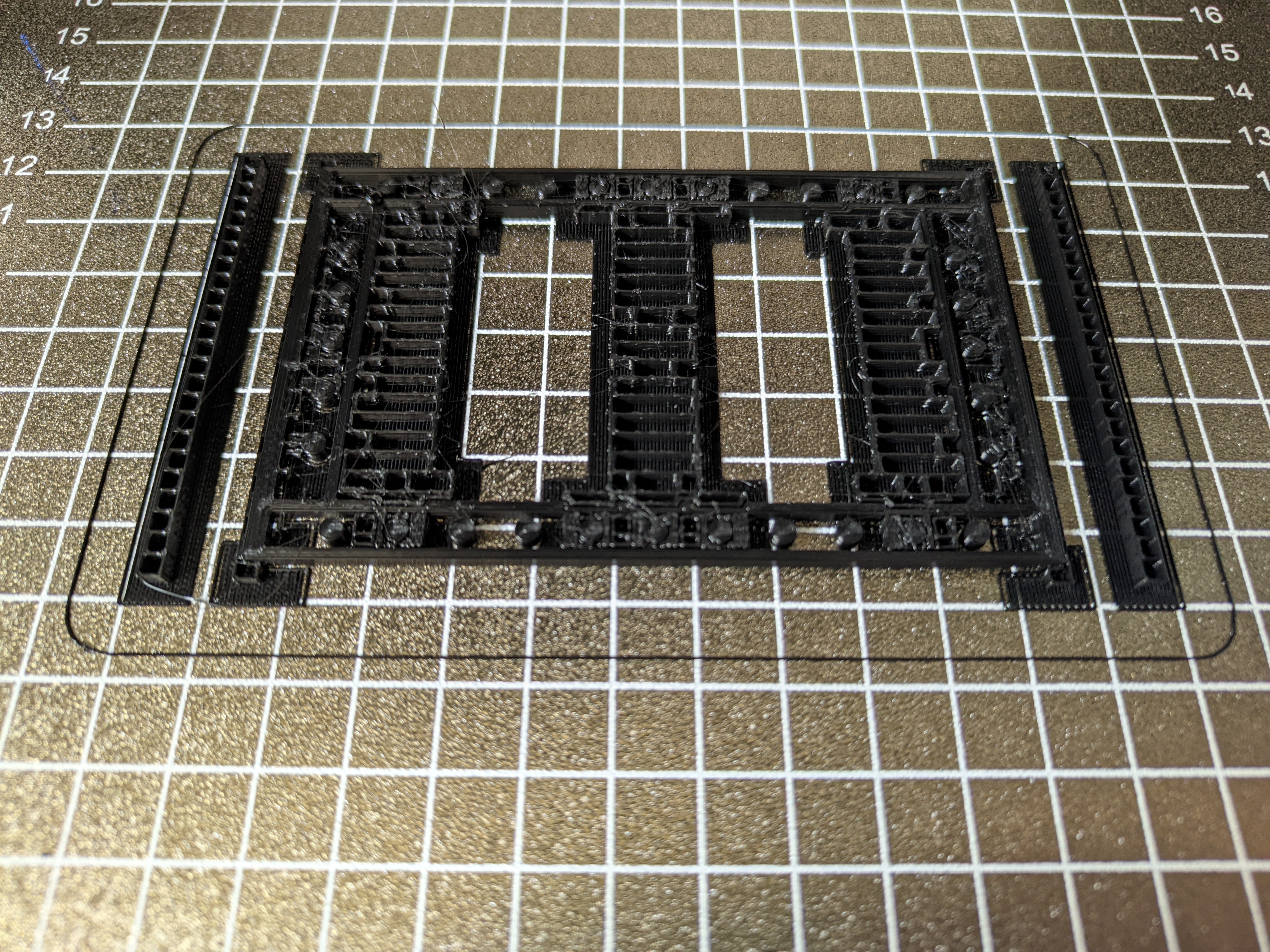
I would really appreciate it if someone could help me with this. I'm having an issue with my Sovol SV06, which is that I get a lot of stringing. I'm still fairly new to 3D printing, so I have no idea what could cause this and how I could go about fixing this. I already searched for this issue online btw but didn't really find anything helpful.

The only change I made to this printer is that I hooked up a Raspberry Pi 4 to it and installed Klipper and Octoprint. I'm also using PrusaSlicer with the config from here.

Edit: Forgot to mention I was using PLA for this print


cross-posted from: https://discuss.tchncs.de/post/18870157

I'm trying to extract the frames of a video as individual images but it's really slow, except when I'm using jpeg. The obvious issue with jpegs is the data loss from the compression, I want the images to be lossless. Extracting them as jpegs manages about 50-70 fps but as pngs it's only 4 fps and it seems to continue getting slower, after 1 minute of the 11 minute video it's only 3.5 fps.

I suspect it's because I'm doing this on an external 5tb hard drive, connected over USB 3.0 and the write speed can't keep up. So my idea was to use a different image format. I tried lossless jpeg xl and lossless webp but both of them are even slower, only managing to extract at about 0.5 fps or something. I have no idea why that's so slow, the files are a lot smaller than png, so it can't be because of the write speed.

I would appreciate it if anyone could help me with this.


I'm trying to extract the frames of a video as individual images but it's really slow, except when I'm using jpeg. The obvious issue with jpegs is the data loss from the compression, I want the images to be lossless. Extracting them as jpegs manages about 50-70 fps but as pngs it's only 4 fps and it seems to continue getting slower, after 1 minute of the 11 minute video it's only 3.5 fps.

I suspect it's because I'm doing this on an external 5tb hard drive, connected over USB 3.0 and the write speed can't keep up. So my idea was to use a different image format. I tried lossless jpeg xl and lossless webp but both of them are even slower, only managing to extract at about 0.5 fps or something. I have no idea why that's so slow, the files are a lot smaller than png, so it can't be because of the write speed.

I would appreciate it if anyone could help me with this.


I installed a GRUB theme and changed some options in the config but now I need to run update-grub (alias for grub2-mkconfig -o /etc/grub2-efi.cfg) after every kernel update or else that new kernel version won't boot. Does anybody know a fix for this?

view more: next ›