Python

7610 readers
1 users here now

Welcome to the Python community on the programming.dev Lemmy instance!

πŸ“… Events

PastNovember 2023

October 2023

July 2023

August 2023

September 2023

🐍 Python project:
πŸ’“ Python Community:
✨ Python Ecosystem:
🌌 Fediverse
Communities
Projects
Feeds

founded 2 years ago
MODERATORS
101
102
103
24
submitted 7 months ago* (last edited 7 months ago) by milon@lemm.ee to c/python@programming.dev


There is an issue with the program when the user correctly guesses the number. The program should end when the break statement executes in the while loop found in main(), but instead it times out.

import random


def main():
    level = get_level()
    number = generate_random_number(level)

    while True:
        guess = get_guess()

        if check_guess(number, guess) == False:
            continue
        else:
            break


def get_level():
    while True:
        level = input("Level: ")

        try:
            int(level)
        except ValueError:
            continue
        if int(level) <= 0:
            continue
        else:
            return int(level)

def generate_random_number(level):
    number = random.randint(1, level)

    return number

def get_guess():
    while True:
        guess = input("Guess: ")

        try:
            int(guess)
        except ValueError:
            continue
        if int(guess) <= 0:
            continue
        else:
            return int(guess)

def check_guess(number, guess):
    if guess > number:
        print("Too large!")

        return False
    if guess < number:
        print("Too small!")

        return False
    if guess == number:
        print("Just right!")

        return True


main()
104
 
 
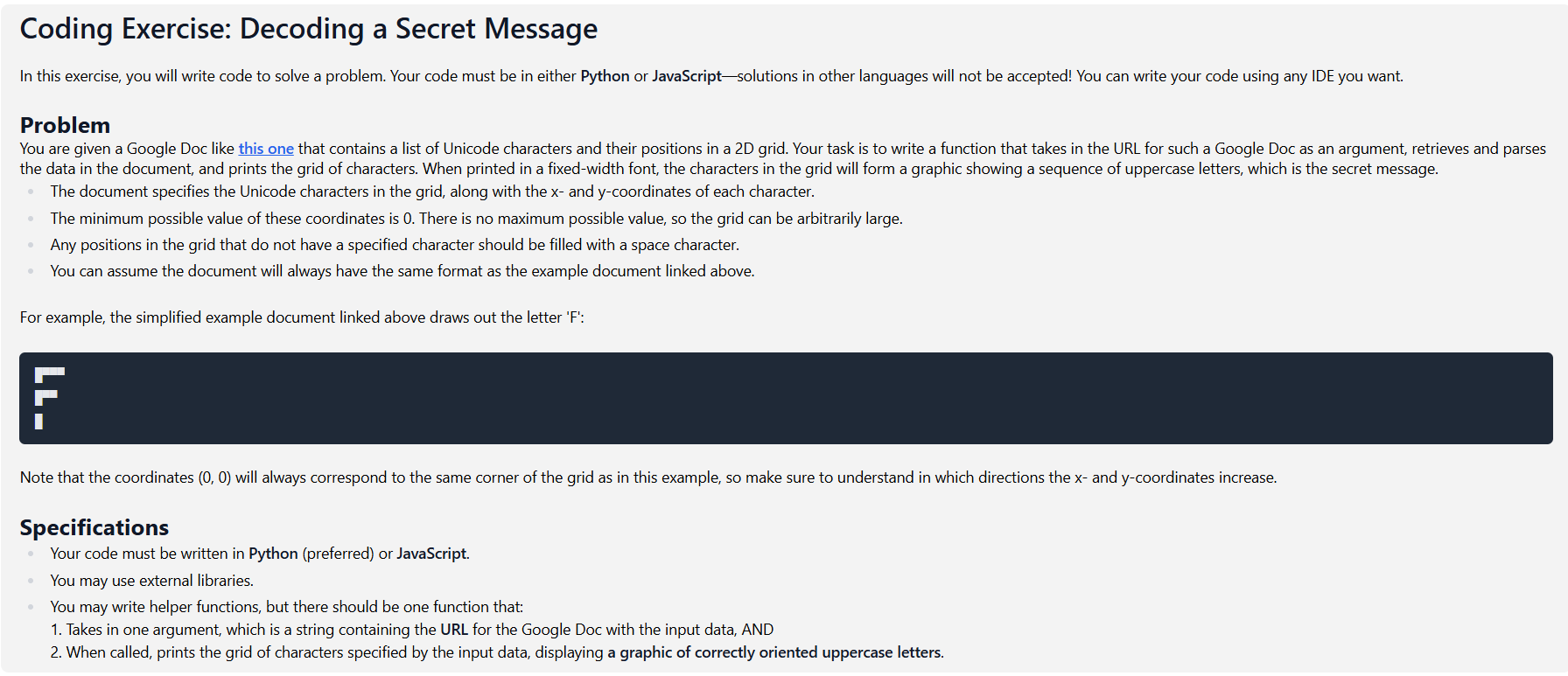
  • I was applying to a job, and then I had to answer a question about web scraping, which I'm not familiar with. I answered all the other questions with no issue, so I decided might as well put in the effort to learn the basics and see if I can do it in a day.
  • Yes, it was *somewhat * easier than I expected, but I still had to watch like 4 YouTube videos and read a bunch of reddit and stack overflow posts.
  • I got the code working, but I decided to run it again to double-check. It stopped working. Not sure why.
  • Testing is also annoying because the "web page" is a google doc and constantly reloads or something. It takes forever to get proper results from my print statements.
  • I attached an image with the question. I haven't heard back from them, and I've seen other people post what I think might be this exact question online, so hopefully I'm not doing anything illegal.
  • At this point, I just want to solve it. Here's the code:
from bs4 import BeautifulSoup
import requests
import pandas as pd
import numpy as np

def createDataframe(url): #Make the data easier to handle
    #Get the page's html data using BeautifulSoup
    page = requests.get(url)
    soup = BeautifulSoup(page.text, 'html.parser')

    #Extract the table's headers and column structure
    table_headers = soup.find('tr', class_='c8')
    table_headers_titles = table_headers.find_all('td')
    headers = [header.text for header in table_headers_titles]

    #Extract the table's row data
    rows = soup.find_all('tr', class_='c4')
    row_data_outer = [row.find_all('td') for row in rows]
    row_data = [[cell.text.strip() for cell in row] for row in row_data_outer]

    #Create a dataframe using the extracted data
    df = pd.DataFrame(row_data, columns=headers)
    return df

def printMessage(dataframe): #Print the message gotten from the organised data
    #Drop rows that have missing coordinates
    dataframe = dataframe.dropna(subset=['x-coordinate', 'y-coordinate'], inplace=True)

    #Convert the coordinate columns to integers so they can be used
    dataframe['x-coordinate'] = dataframe['x-coordinate'].astype(int)
    dataframe['y-coordinate'] = dataframe['y-coordinate'].astype(int)

    #Determine how large the grid to be printed is
    max_x = int(dataframe['x-coordinate'].max())
    max_y = int(dataframe['y-coordinate'].max())

    #Create an empty grid
    grid = np.full((max_y + 1, max_x + 1), " ")

    #Fill the grid with the characters using coordinates as the indices
    for _, row in dataframe.iterrows():
        x = row['x-coordinate']
        y = row['y-coordinate']
        char = row['Character']
        grid[y][x] = char
    for row in grid:
        print("".join(row))

test = 'https://docs.google.com/document/d/e/2PACX-1vQGUck9HIFCyezsrBSnmENk5ieJuYwpt7YHYEzeNJkIb9OSDdx-ov2nRNReKQyey-cwJOoEKUhLmN9z/pub'
printMessage(createDataframe(test))

My most recent error:

C:\Users\User\PycharmProjects\dataAnnotationCodingQuestion\.venv\Scripts\python.exe C:\Users\User\PycharmProjects\dataAnnotationCodingQuestion\.venv\app.py 
Traceback (most recent call last):
  File "C:\Users\User\PycharmProjects\dataAnnotationCodingQuestion\.venv\app.py", line 50, in <module>
    printMessage(createDataframe(test))
  File "C:\Users\User\PycharmProjects\dataAnnotationCodingQuestion\.venv\app.py", line 30, in printMessage
    dataframe['x-coordinate'] = dataframe['x-coordinate'].astype(int)
                                ~~~~~~~~~^^^^^^^^^^^^^^^^
TypeError: 'NoneType' object is not subscriptable

Process finished with exit code 1
105


I've been trying to get luarocks to work on windows, and all it gives is cryptic gcc errors.

How does pip manage to work on most platforms without issues?

106
107
23
How is my Python code? (raw.githubusercontent.com)
submitted 7 months ago* (last edited 7 months ago) by the_citizen@lemmy.world to c/python@programming.dev


I don't know if it's the true place to ask, apologizing if not. I started to python one and half week ago. So I'm still beginner.

I made a terminal based weather application with python. What do you think about the code, is it good enough? I mean is it professional enough and how can I make the same functions with more less code?

Here's the main file (I also added it as url to post): https://raw.githubusercontent.com/TheCitizenOne/openweather/refs/heads/main/openweather.py
Here's the config.json file: https://raw.githubusercontent.com/TheCitizenOne/openweather/refs/heads/main/config.json

108
109


cross-posted from: https://lemmy.world/post/28263533

πŸ‘Š TARIFF πŸ”₯

The GREATEST, most TREMENDOUS Python package that makes importing great again!

TARIFF is a fantastic tool that lets you impose import tariffs on Python packages. We're going to bring manufacturing BACK to your codebase by making foreign imports more EXPENSIVE!

110
111


I can't get my program to use pandoc from inside a venv.

I can use pandoc from the system context.

From inside the venv

which pandoc
/usr/bin/pandoc 

I've installed pandoc inside the venv with pip, and confirmed the files are in the venv.

What am I missing?

112


Hello, Python Community!

Has someone been able to successfully connect to an IBM Informix DB with a Python app? I have the following environment: DEV: Windows 11 Python 3.13.3 64-bit VS Code

DB: IBM Informix 12.10 hosted in Azure I'm able to connect to it usind DBeaver (JDBC)

I have tried the following libraries to try to establish the connection: ibm_db: Traceback (most recent call last): File "c:\Users\peterg\source\python\dbApp\ibm_db_test.py", line 1, in <module> import ibm_db as db ImportError: DLL load failed while importing ibm_db: The specified module could not be found._

pyodbc: I have an ODBC DSN connection established Traceback (most recent call last): File "c:\Users\peterg\source\python\dbApp\pyodbc_test.py", line 3, in <module> conn = db.connect("Dsn='DSN_NAME'") pyodbc.InterfaceError: ('IM002', '[IM002] [Microsoft][ODBC Driver Manager] Data source name not found and no default driver specified (0) (SQLDriverConnect)')

JayDeBeAPI: I have downloaded the same JAR files as DBeaver uses and copied them to a dir local to the project and added the CLASSPATH variable: set "CLASSPATH=%PROJECT_ROOT%\Java\jbc-4.50.10.1.jar:%PROJECT_ROOT%\Java\bson-3.8.0.jar"

File "c:\Users\peterg\source\python\dbApp\JayDeBeApi_test.py", line 3, in <module> dbConn = db.connect("com.informix.jdbc.IfxDriver", "jdbc:informix-sqli://hostname:port/db_name:INFORMIXSERVER=server_name", ['user', 'pass']) File "C:\Users\peterg\AppData\Local\Programs\Python\Python313\Lib\site-packages\jaydebeapi\__init__.py", line 412, in connect jconn = _jdbc_connect(jclassname, url, driver_args, jars, libs) File "C:\Users\peterg\AppData\Local\Programs\Python\Python313\Lib\site-packages\jaydebeapi\__init__.py", line 221, in _jdbc_connect_jpype jpype.JClass(jclassname) ~~~~~~~~~~~~^^^^^^^^^^^^ File "C:\Users\peterg\AppData\Local\Programs\Python\Python313\Lib\site-packages\jpype\_jclass.py", line 99, in __new__ return _jpype._getClass(jc) ~~~~~~~~~~~~~~~~^^^^ TypeError: Class com.informix.jdbc.IfxDriver is not found

PyInformix: SADeprecationWarning: The dbapi() classmethod on dialect classes has been renamed to import_dbapi(). Implement an import_dbapi() classmethod directly on class <class 'pyinformix.ifx_jdbc.InformixJDBCDialect'> to remove this warning; the old .dbapi() classmethod may be maintained for backwards compatibility. engine = create_engine('informix+ifx_jdbc://hostname:port/db_name;INFORMIXSERVER=server_name;delimident=y;user=user;password=pass') Traceback (most recent call last): File "c:\Users\peterg\source\python\dbApp\PyInformix_test.py", line 5, in <module> conn = engine.connect() File "C:\Users\peterg\AppData\Local\Programs\Python\Python313\Lib\site-packages\sqlalchemy\engine\base.py", line 3274, in connect return self._connection_cls(self) ~~~~~~~~~~~~~~~~~~~~^^^^^^ File "C:\Users\peterg\AppData\Local\Programs\Python\Python313\Lib\site-packages\sqlalchemy\engine\base.py", line 146, in __init__ self._dbapi_connection = engine.raw_connection() ~~~~~~~~~~~~~~~~~~~~~^^ File "C:\Users\peterg\AppData\Local\Programs\Python\Python313\Lib\site-packages\sqlalchemy\engine\base.py", line 3298, in raw_connection return self.pool.connect() ~~~~~~~~~~~~~~~~~^^ File "C:\Users\peterg\AppData\Local\Programs\Python\Python313\Lib\site-packages\sqlalchemy\pool\base.py", line 449, in connect return _ConnectionFairy._checkout(self) ~~~~~~~~~~~~~~~~~~~~~~~~~~^^^^^^ File "C:\Users\peterg\AppData\Local\Programs\Python\Python313\Lib\site-packages\sqlalchemy\pool\base.py", line 1264, in _checkout fairy = _ConnectionRecord.checkout(pool) File "C:\Users\peterg\AppData\Local\Programs\Python\Python313\Lib\site-packages\sqlalchemy\pool\base.py", line 713, in checkout rec = pool._do_get() File "C:\Users\peterg\AppData\Local\Programs\Python\Python313\Lib\site-packages\sqlalchemy\pool\impl.py", line 179, in _do_get with util.safe_reraise(): ~~~~~~~~~~~~~~~~~^^ File "C:\Users\peterg\AppData\Local\Programs\Python\Python313\Lib\site-packages\sqlalchemy\util\langhelpers.py", line 146, in __exit__ raise exc_value.with_traceback(exc_tb) File "C:\Users\peterg\AppData\Local\Programs\Python\Python313\Lib\site-packages\sqlalchemy\pool\impl.py", line 177, in _do_get return self._create_connection() ~~~~~~~~~~~~~~~~~~~~~~~^^ File "C:\Users\peterg\AppData\Local\Programs\Python\Python313\Lib\site-packages\sqlalchemy\pool\base.py", line 390, in _create_connection return _ConnectionRecord(self) File "C:\Users\peterg\AppData\Local\Programs\Python\Python313\Lib\site-packages\sqlalchemy\pool\base.py", line 675, in __init__ self.__connect() ~~~~~~~~~~~~~~^^ File "C:\Users\peterg\AppData\Local\Programs\Python\Python313\Lib\site-packages\sqlalchemy\pool\base.py", line 901, in __connect with util.safe_reraise(): ~~~~~~~~~~~~~~~~~^^ File "C:\Users\peterg\AppData\Local\Programs\Python\Python313\Lib\site-packages\sqlalchemy\util\langhelpers.py", line 146, in __exit__ raise exc_value.with_traceback(exc_tb) File "C:\Users\peterg\AppData\Local\Programs\Python\Python313\Lib\site-packages\sqlalchemy\pool\base.py", line 897, in __connect self.dbapi_connection = connection = pool._invoke_creator(self) ~~~~~~~~~~~~~~~~~~~~^^^^^^ File "C:\Users\peterg\AppData\Local\Programs\Python\Python313\Lib\site-packages\sqlalchemy\engine\create.py", line 646, in connect return dialect.connect(*cargs, **cparams) ~~~~~~~~~~~~~~~^^^^^^^^^^^^^^^^^^^ File "C:\Users\peterg\AppData\Local\Programs\Python\Python313\Lib\site-packages\sqlalchemy\engine\default.py", line 625, in connect return self.loaded_dbapi.connect(*cargs, **cparams) # type: ignore[no-any-return] # NOQA: E501 ~~~~~~~~~~~~~~~~~~~~~~~~~^^^^^^^^^^^^^^^^^^^ File "C:\Users\peterg\AppData\Local\Programs\Python\Python313\Lib\site-packages\jaydebeapi\__init__.py", line 412, in connect jconn = _jdbc_connect(jclassname, url, driver_args, jars, libs) File "C:\Users\peterg\AppData\Local\Programs\Python\Python313\Lib\site-packages\jaydebeapi\__init__.py", line 221, in _jdbc_connect_jpype jpype.JClass(jclassname) ~~~~~~~~~~~~^^^^^^^^^^^^ File "C:\Users\peterg\AppData\Local\Programs\Python\Python313\Lib\site-packages\jpype\_jclass.py", line 99, in __new__ return _jpype._getClass(jc) ~~~~~~~~~~~~~~~~^^^^ TypeError: Class com.informix.jdbc.IfxDriver is not found

IfxPy:

Uanble to install, seems that it does not support the latest Python 3 version.

Any help would be appreciated. I can attach the sample code of every method I tried if that would help.

113


It isn't anything particularly amazing but I'm proud of it! Code can be found here: https://github.com/ArmoredThirteen/PysidianSiteMaker

The general use case is that I'm making a setting and I store all my notes in an Obsidian project. It used to be when I shared notes it was a giant pain trying to send people files so I decided to set up a website. I was using a tool called ObsidianHTML but it doesn't get updated very often and I've had to do some questionable downgrades on my build server to keep using it. It's also way more advanced than what I have use for and I get lost in the aging documentation

So now I'm building a replacement command line tool! My build server picks up on changes made to the settings repo, pulls them in and my PSM code, converts the vault to an html website, and deploys from there. Bonus points is that since my tool is so dedicated purpose the build times have been cut so I can deploy faster than ever

I've never made anything like this before and I'm admittedly not great at Python, I've spent most my time in C#. I know there are lots of areas that aren't written the best and I'm sure there's plenty I don't know about too, despite the small size. I'm always up for feedback!

114
115
116
117
118


Was going through a Python tutorial, but it seems kinda dated. Wanted to know if people regularly use docstrings in the workforce. Or are they somewhat irrelevant because you can convey most of that info via comments and context? Do jobs make you use them?

119
120


Hello if anyone knows of a way to get python-markdown to behave in the way I'd like, or of an alternative way to do it, I'd love some help! My use case is I'm converting .md files made with Obsidian into html files. Obsidian has tags that are a pound sign followed by the tag (so like "#TagName"). When the tag is the first item on a line the pound sign is confused for a heading, even though there is no space after it.

Is there a way that I can avoid this so it only reads it as a heading if there is a space between the pound and the next word? I'm even considering some kind of find/replace logic so I can swap it out with like a link to a page that lists all the pages with that tag or something that gets run before the markdown to html conversion.

Edit: The solution I'm going for is a regex find/replace. Currently the string pattern looks like "#[^\s#][^\s" + string.punctuation + "#]*" which can find tags but ignores headers. Since the ultimate goal is to have the tags link to a tag page anyway I can solve it all in one step by doing a replace with a relevant link.

121


cross-posted from: https://lemm.ee/post/59714239

Some custom filter kernel to average out values from a chunk of pixels with some kind of "border aware" behaviour?

122


I have a rather large Python script that I use as basically a replacement for autohotkey. It uses pynput for keyboard and mouse control - and at least on Windows, it works exactly how I expect.

I recently started dual-booting with Linux and have been trying to get the script to work here as well. It does work but with mixed results - in particular, I found that pynput has bizarrely wrong output for special characters, in a way that's both consistent and inconsistent.

The simplest possible case I found that reproduces the error is this script:

import time
from pynput import keyboard

# Sleep statement is just to give time to move the mouse cursor to a text input field
time.sleep(2)

my_kb = keyboard.Controller()

text = 'πŸ†' # Eggplant emoji
my_kb.type(text)

time.sleep(1)

text = 'π•₯𝕖𝕀π•₯' # blackboard bold test
my_kb.type(text)

time.sleep(1)

text = '𝐭𝐞𝐬𝐭' # bold test
my_kb.type(text)

When I run that script right now, it produces the output "πŸ†π•₯π•₯𝕀π•₯𝐭𝐭𝐬𝐭". And if I run it again, it'll produce the same output. And if I change the eggplant emoji to something else, like the regular character 'A', it will still produce the same output (specifically "Aπ•₯π•₯𝕀π•₯𝐭𝐭𝐬𝐭"). But... If I log out and log back in, then the output changes to something else that's still wrong, but differently. For example, when I changed the eggplant to a regular 'A', then relogged, the output became "Aπ•₯𝕖𝕖π•₯𝐭𝐞𝐞𝐭". And then that wrong output will keep being the same wrong output until I log out and back in again. If the test strings don't change, then the incorrect outputs don't change on relog - but if they do, then they do.

In the larger script, errors seemed to chain together somehow - like if I produced an eggplant emoji, then tried to write blackboard bold test, I would get "πŸ†π•–π•€πŸ†". This is despite verifying just before running the pynput.keyboard.Controller.type function that what it was about to type was correct. The issue also happens if I type it character-by-character with press and release functions.

I am very new to Linux. I'm on Linux Mint. I'm running this in a python3 venv that just has pynput and two other external libraries installed. ChatGPT thinks the issue might be related to X11. The issue does not occur at all on Windows, using the exact same code. On Linux there seems to be no issues with typing regular text, just special characters.

123
124
125


I made this Python menu-driven CLI script for yt-dlp. It guides you through a series of menus to download content from a YouTube URL.

If anyone is interested, feedback would be greatly appreciated as only I have tested this so far, and I want to make sure it works for other people's systems.

If you encounter any issues or bugs, let me know so I can fix them!

Edit: I should mention: This is not a pipx package. That was never the intention developing this initially. I might make it a package in the future, but for now, it is just a project directory.

view more: β€Ή prev next β€Ί