Godot

7226 readers
44 users here now

Welcome to the programming.dev Godot community!

This is a place where you can discuss about anything relating to the Godot game engine. Feel free to ask questions, post tutorials, show off your godot game, etc.

Make sure to follow the Godot CoC while chatting

We have a matrix room that can be used for chatting with other members of the community here

Links

Other Communities

Rules

We have a four strike system in this community where you get warned the first time you break a rule, then given a week ban, then given a year ban, then a permanent ban. Certain actions may bypass this and go straight to permanent ban if severe enough and done with malicious intent

Wormhole

!roguelikedev@programming.dev

Credits

founded 2 years ago
MODERATORS
51
52


This RC2 fixes the last of the critical regressions that we are aware of. Unless someone reports a new regression coming from the changes made in RC1 or RC2, we should be on track to release 4.5 stable soon.

Fiiiinally. Hopefully everything is patched up because 4.5 has been in feature freeze for a while now.

53


Hi everyone! Let’s create another shader in Godot Engine. I was thinking about how we could combine the organized chaos represented by fractal Brownian motion with image post-processing. The result is what you now see in the video, and we could use it in game development to simulate, for example, entering an area that negatively affects the hero’s perception of reality.

54


Hey all. I'm looking for your favourite games that were made in Godot that are available to play on Steam or itch.io (or other??)

I'm already familiar with such bangers as Dome Keeper and Sapo 3D. What else do you suggest? I'm open to your own games/self promo, or any others you are aware of.

55
56


4.5 release is imminent!

57
58


Hi everyone! This time I’d like to show how a 2D shader can be used in a 3D scene, which can have plenty of applications in 3D games.

59
35
submitted 3 months ago* (last edited 3 months ago) by Kelly@lemmy.world to c/godot@programming.dev
 
 
  • Compositor Effects And You: Unlocking Godot's Potential For Advanced Graphics Techniques - Acerola
  • Events Are The Way To Go(dot) - Eric Peterson
  • Building cross-platform non-game applications with Godot - HP van Braam - GodotCon2025
  • Making Stylized 3D Games In Godot - Shane Denhardt & Kiril Pashev
  • Improving Your UI in Godot - Rawb Herb
  • Introducing 3D Tiles For Godot -Leonidas Neftalí
  • Narrative Design for Solo Devs - Nicholas O'Brien
  • HolyOS - making a fake operating system in Godot - Davide Di Staso
  • I Make Games On My Phone (And They Actually Work) - Chad Stewart
  • State of Godot and the Web - Adam Scott
  • The Youtube Crash Course for Game Devs - @stayathomedev
  • Adding new Script Languages to Godot - Jeff Ward
  • LibGodot - Embed Godot Engine Everywhere - Gergely Kis
  • Xogot - Miguel de Icaza
  • Enjoyable Game Architecture with Godot & C# - Mark Wilson
  • Unit Testing Games - TDD/Godot/GUT - Butch Wesley
  • Keeper to Keepers: Adding Multiplayer to Dome Keeper - Chris Ridenour
  • Introducing Aspire - Local dev for your full stack made easy - Maddy Montaquila
  • Building a Godot Plugin with GDExtension - Scott Doxey
  • I Work For Godot, AMA - Emilio Coppola, David Snopek, Adam Scott
  • Multiplayer Basics in Godot - Travis Hunter
  • Markov Chain with a Shotgun: Open Language Models in Godot - Simon
  • Embedding Godot: spicing up your app with SwiftGodotKit and more - Miguel de Icaza
  • Lessons from 25+ Game Jams with Godot - Marek Belski
  • From Local Networking to Scalable Solutions - JamesClancey
  • Custom Resources for global state management - Sam Szuflita
  • Time Management in Game Development - Matthew Ponder
  • Going Mobile with Godot - Joseph Hill
  • Log.gd, a Godot pretty-printer - Russell Matney
  • Synths and Sound Design in Godot with Csound - Werner Mendizabal
  • Preparing Anime-Style 3D Characters for Godot Using Blender - Jesse (CoderNunk)
  • Cross-Disciplinary Collaboration in Godot -Casey Dahlgren, Sarah Nuse
  • Using Godot for mixed-reality livestreaming - badcop
  • Profiling Godot Engine Games on Android with Arm Performance Studio - Ian Bolton
  • Making Operation Outbreak - Andrés Colubri & Harmony Honey Monroe
  • The Player to Contributor Pathway - Heather Drolet, Justin Borque
  • What's new in XR & Android - David, Fredia, Logan
  • Bringing the Arcade to the Museum with Godot - Annalivia, Tyler
60


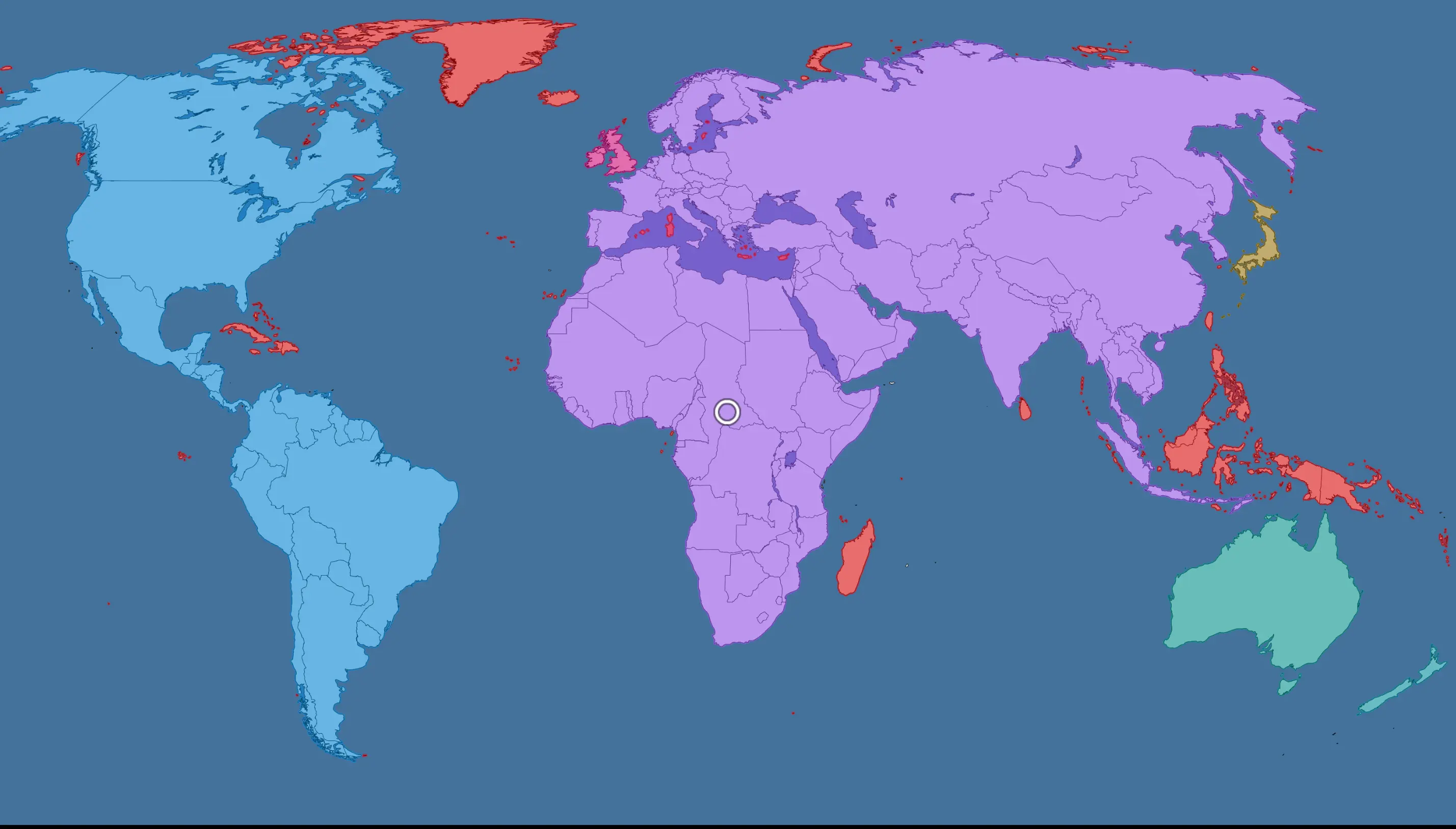
After a bit of searching, I found that the best way to create an Area2d using a map was the built in function to create CollisionPolygon2Ds hidden in the "Sprite2D" tab. Took a bit of looking around to find that. After doing that, I grouped relevant territories together into Area2Ds (e.g. Australia + Tasmania, most of the Indonesia islands).

The only issue I have with it now is that it combines a bunch of the countries, particularly America (the continent) and Afro-Eurasia. It was pretty bang on for most of the islands though, see Australia, Japan, Madagascar, and New Zealand. Greenland got a bit of Canada so I'll need to fix that.

I've also made a small script that draws a Polygon2D with the correct map colour for . The default is red, so you can see that I have currently set America blue, Afro-Eurasia purple, the British Isles pink, Australia and New Zealand green (the latter being slightly bluer), and Japan yellow. These colours are just for testing and I think it looks pretty good.

I will probably find individual maps for each country and create collision shapes using those for the countries in Afro-Eurasia and America (i.e. almost all of them...). One thing of note, I have split the collision shape of Papua into West and East by duplicating it and manually deleting the points on either side, then putting each half into separate Area2Ds. This is obviously not feasible for Afro-Eurasia and America, but I might do that for Ireland to split the north and south.

One annoying thing is that I can't seem to select multiple points and delete them all at once in Godot. Anyone know what button to press to do that? Is there some sort of toggle? Another really annoying thing was adding the "territory(dot)gd" script to each and every Area2D, you can select multiple objects and remove their scripts, but not attach (you have to attach one by one...).

here's what my project looks like:

edit: replaced .gd with (dot)gd...just in case

61


Now the realms of each Anemoi use different unique tilesets which I think turned out really well! For Boreas, the north winter wind, it is cold and snowy (snow particles tbd) with warm lamps and glowing ice blocks. For Zephyrus and Notus, it is warm and grassy with colourful flowers and bushes that emanate light. The first level is the realm of Prometheus and has a nice red carpet and has a collection of books, chairs, and desks. Classroom-like as it is the tutorial level.

There are still a few things to do: I need to make the tileset for the Eurus level as well as more decorations for the tutorial level (esp. lights as it currently appears out of thin air)

I also need to make more levels using the Dionysus tileset, currently I only have one that is half-done.

here are some screenshots:

62


Hey, everybody! We've completed 10 episodes of the series on modeling 3D scenes using raymarching technology, so it's probably time to try something a bit simpler again. The shader you're looking at right now looks quite nice and usable, and it's not too complicated to program. Let's dive in.

63


cross-posted from: https://lemmy.blahaj.zone/post/30613855

Feedback for my first (mini-) game?

I finished this first game of mine about three months ago. Back then i was too anxious to post it. I would love some feedback on it generally. i am aware of some bugs, and generally know how to do it better nowadays, but i didn't want to touch the code anymore. I'd describe myself as Gamedesigner first, coder second, and artist last. so i would be especially interested in how the game feels to you.

Thanks to everyone who took time out of their day for this :3

64


🌻 Highlights

  • PhantomVar<T> for properties without a backing field
  • Base::to_init_gd() to access pointer during initialization
  • Gd::try_dynify() for runtime trait downcast
  • Further improvements to match_class! dispatch

📚 Further reading

Full Changelog.

65


I'm trying to make a game situated during the Cold War in a style a bit like HOI4, but instead of fighting with divisions and doing stuff like encirclements, it's turn by turn like Pokemon, and there would be more of a focus on unrealistic scenarios over historical.

Is it possible to create a collisionshape2d using an image of a map of countries or provinces? Making all the polygons sounds painful.

66


Hi everybody. I think there's one more topic I haven't touched on yet, which also belongs in our series on raymarching technology. It's about creating arbitrary shapes using planes with various positions and rotations. So let's take a look at how we can compute the rendering of the so-called Platonic solids.

67


Hi everybody. It's still summer 2025, and to take a short break from further improvements to our raymarching shader, this time we'll create something really simple. We'll use the Voronoi algorithm, which we know from several previous tutorials, but we'll map it onto a sphere, so we’ll end up with something like a slightly strange planet or a dead star.

68
28
submitted 4 months ago* (last edited 4 months ago) by Eibriel@sopuli.xyz to c/godot@programming.dev


Most probably not a great idea, thanks to Godot I was able to go from idea to Steam page with trailer in 5 days.

I needed to do that very quickly for reasons, and Godot is amazing, to just throw something together, iterating really fast, and exporting in video format.

The integration with Blender is chef kiss

69


Hello, as the title says, I am very new to Godot. I just finished following the 2D Game Tutorial, and I have a question on this part: https://github.com/godotengine/godot-demo-projects/blob/bf4d1038d623c355f3b49e613a2c9b686eebb312/2d/dodge_the_creeps/main.gd#L44

Basically, I had the idea to play around and try to give the mob a curved path, so I tried mob. in Godot's script editor looking for the completion engine to find me things similar to .linear_velocity only to find nothing, and also that linear_velocity didn't even show up as an autocomplete suggestion. No errors or warnings, and the code runs fine.

Question 1: Why does linear_velocity not get suggested? How can I change that, so I can have the editor help me learn the language and APIs?


Question 2: Unrelated to the above. I like Vim motions. Any suggestions on either:

  • Installing a Godot plugin to get Vim bindings?
  • Setting up Godot to use Neovim as my external editor?
  • Just using Neovim externally to edit my GD scripts?

Just looking for thoughts on what people use and like.

70


I hope they got all the regressions now, this has been the longest beta period of any version yet. I really want 4.5 to release so I can upgrade my project already!

71
72
9
submitted 4 months ago* (last edited 4 months ago) by Levi@lemmy.ca to c/godot@programming.dev


Hi, I've been playing around with Godot to learn some game development skills, but I've run into a problem. I'm trying to display some 2d "cards" on the screen, and their texture is being generated by a shader. However, each card looks exactly the same, where I'd like some variation between the cards.

So I passed a seed value into my shader using:

instance uniform float seed;

And in my GDScript code:

func _ready() -> void:
    color_rect.material.set_shader_parameter("seed", randf() )

I've also tried:

func _ready() -> void:
    color_rect.set_instance_shader_parameter("seed", randf() )

Nothing breaks, but each of my cards are still identical, as if the seed value is the same for all three cards. From what I've read, the 'instance' keyword should let me pass a unique seed value for each object using the shader, right?

73


I am trying to Implement multiplayer into my relativly empty project but for some reason the player that joins doesnt get a camera assigned and cant walk/move their camera, I followid this tutorial: https://www.youtube.com/watch?v=G28bNlgICJg but it doesn’t seem to work properly. I am using a MultiplayerSpawner and MultiplayerSynchronizer

I put the code in this godot forums post: https://forum.godotengine.org/t/help-with-multiplayer-players-that-join-can-see-anything-or-walk/118322

Any help is Appreciated

74


Hi everyone! It looks like we’ll be spending a lot of summer with the raymarching series because I’m back with a new episode — the number nine already. This time, I’d like to take a look at calculating and rendering light reflections, which can be useful if we want to use reflective materials.

75


I'm using godot-rust bindings to provide some additional functionality to my codebase. I wrote methods associated with a struct that I would like to use in my game and made a few unit tests to ensure that they're working correctly. After godotifying my struct with attributes described in Hello World section of the godot-rust book I got a slew of errors, some of which are about initialization of the struct in test functions. After clearing them all and executing MyClass:new_alloc() at the beginning of a test function the compiler complains that Godot engine is not available. I hit a roadblock because I don't know how to execute tests in Godot environment. Changing #[test] to #[itest] makes the code compile but that's because it executes 0 tests; from what I see itest is meant for developing godot-rust anyway. What is the preferred way of unit testing godot-rust code?

view more: ‹ prev next ›